

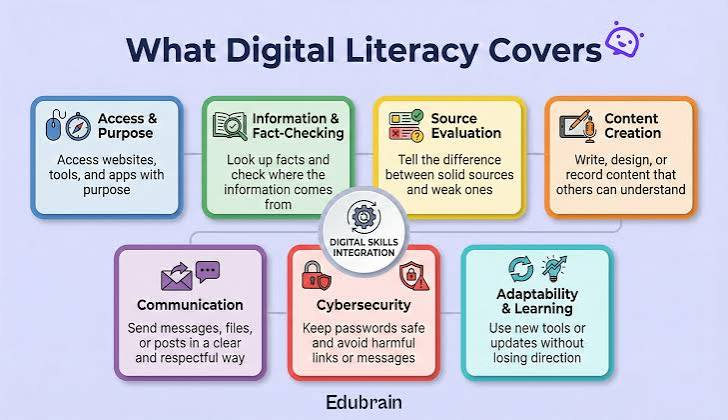
Digital literacy is not simply the ability to open a browser or install an application. It is the practical knowledge needed to find information, protect accounts, communicate respectfully, and use digital tools with confidence. These skills matter at school, at work, and in daily life. Technology changes quickly, but a handful of dependable principles remain useful across different devices and services. This guide introduces those foundations in accessible language and explains how small, consistent habits can improve security, accuracy, and independence online.
Understand Your Device and Its Settings
Begin by learning the basic controls on the device you use most often. Know how to adjust privacy settings, install updates, manage storage, and locate downloaded files. Explore the accessibility options even if you do not need them today; text size, captions, voice controls, and contrast settings can improve comfort for many users. Read permission requests before accepting them. A photo-editing app may reasonably need access to selected images, but a simple calculator usually does not need your contacts. Understanding settings helps you notice when a request seems unrelated to an application’s real purpose.
Build Strong Account Habits
Online accounts often protect private conversations, purchases, and personal information. Use long, unique passwords or passphrases, and consider a reputable password manager to organize them. Enable a supported second verification method on important accounts. Avoid reusing passwords because one exposed service can otherwise put several accounts at risk. Review recovery options, such as backup email addresses, so you can regain access if you lose a device. Never share verification codes with strangers who contact you unexpectedly. Good account security depends less on obscure tricks than on consistently applying a few practical safeguards.
Learn to Recognize Suspicious Messages
Scam messages may imitate delivery companies, banks, employers, or friends. They often create urgency by claiming that an account will close or a payment must be made immediately. Instead of following an unexpected link, open the service through its usual app or a verified address you already know. Check the sender carefully, but remember that familiar-looking names can be spoofed. Do not download unexplained attachments or send personal information in response to unsolicited requests. When uncertain, contact the organization through an independent channel. A brief pause before acting can prevent problems that are difficult to reverse.
Search for Answers Efficiently
Effective searching begins with clear keywords. Instead of entering a very broad question, include the important details: a device model, task, error message, or location when relevant. Compare results and distinguish official instructions from community discussions. Both can be useful, but they answer different needs. Official documentation is generally the best place to confirm product features or supported procedures, while user discussions may reveal common difficulties. Check dates when instructions involve changing technology. If your first query fails, adjust the terms rather than assuming no answer exists. Searching is a skill that improves with deliberate practice.
Evaluate Information Before Sharing It
A professional design and confident tone do not guarantee accuracy. Look for authorship, dates, evidence, and references to original information. Ask whether a headline matches the full article and whether a screenshot shows enough context to interpret a claim. For important decisions, check independent sources and official guidance. Be especially cautious about content promising guaranteed results or urging immediate action. If you cannot verify a claim, avoid presenting it as fact when passing it along. Digital literacy includes responsibility for what we amplify, not merely the ability to find and repost interesting material.
Protect Personal Information Thoughtfully
Not every service needs every detail about you. Before creating an account, consider which fields are essential and which are optional. Review visibility settings on public profiles and think carefully before posting information about someone else. Pictures can reveal locations, documents, or names unintentionally, so inspect backgrounds and metadata when privacy matters. Public posts may remain accessible long after you forget them. This does not mean avoiding online participation. It means making intentional choices about what you disclose, who can see it, and whether the information will still be appropriate in another context.
Communicate Clearly and Respectfully
Digital communication removes many facial expressions and tone cues that help people understand one another. A short message can sound harsher than intended, while a vague instruction may create confusion. State the purpose early, provide relevant details, and choose a level of formality that fits the relationship. Before forwarding screenshots or private messages, consider whether the original sender expected them to remain confidential. Disagreement is normal, but insults rarely strengthen a position. Clear communication saves time, reduces misunderstandings, and builds trust in both professional communities and personal conversations.
Organize Files for Easy Retrieval
A folder full of files called “final,” “final2,” and “new final” is difficult to navigate. Use descriptive names that include the project, date, or version when appropriate. Create a simple folder structure and store important material in a reliable backup location. Check that you can actually restore files rather than assuming backups are working. Understand the difference between a file stored locally and a document synchronized through a cloud service. Organization becomes particularly valuable when replacing a device or collaborating with others. A modest naming system saves repeated searching and reduces accidental overwrites.
Learn the Basics of Digital Collaboration
Shared documents, task boards, and video meetings are now common in many kinds of work. Understand who can view, comment on, and edit a shared file before sending access. Use clear document titles and explain the action you want from collaborators. When editing a shared resource, avoid replacing another person’s work without checking the revision history. Keep meeting notes focused on decisions, owners, and next steps. These habits are less about mastering a particular platform than about reducing confusion. When responsibilities are visible, digital tools become aids to cooperation rather than sources of duplicated effort.
Stay Curious Without Trying to Know Everything
No one can master every new feature or online service. Focus on transferable habits: reading instructions, verifying sources, testing changes safely, and asking precise questions. Learn a new tool through a low-risk practice task before depending on it for important work. When something does not behave as expected, observe what changed and check the official help materials. Avoid altering multiple settings at once, since that can make troubleshooting difficult. Confidence grows from understanding how to learn, not from memorizing every interface. Technology becomes more manageable when unfamiliar problems are treated as questions that can be investigated.
Conclusion: Good Digital Habits Create Freedom
The most important digital literacy basics combine security, critical thinking, clear communication, and practical organization. They help you avoid common mistakes while making better use of the tools available to you. You do not need specialized technical knowledge to begin. Choose one habit to strengthen this week, such as reviewing account recovery settings, improving file names, or checking sources before sharing claims. Each small improvement reduces friction and expands what you can do independently. Over time, these skills make the online world feel less confusing and more useful.
