

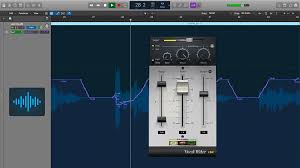
In the digital age, multimedia consumption has become a key part of daily life. Whether it is streaming videos, listening to music, or editing audio, having tools that enhance the audio experience is critical. VolumeRider is one such tool that has attracted attention for its promise to improve sound management across devices. This review explores its features, performance, and overall value, helping you determine if it is the right choice for your needs.
What is VolumeRider?
VolumeRider is an advanced audio control application designed to provide users with precise control over volume levels. Unlike the standard volume controls that come with most devices, VolumeRider offers a suite of features to manage sound dynamically. It is compatible with a variety of operating systems and devices, making it suitable for personal, professional, and entertainment use.
The primary goal of VolumeRider is to give users a seamless audio experience, allowing for customization and optimization without compromising quality. Its interface is designed to be intuitive, catering both to beginners and tech-savvy users.
Key Features of VolumeRider
Understanding the features of VolumeRider is essential to grasp its full potential. The software is packed with functionalities that make audio control more sophisticated and enjoyable. Here are the standout features:
Dynamic Volume Adjustment
VolumeRider allows users to adjust volume levels dynamically based on usage. For instance, it can automatically lower volume when switching between applications or boost sound for media playback. This feature ensures that the audio output remains consistent and comfortable, reducing the need for manual adjustments.
Customizable Sound Profiles
One of the most valuable aspects of VolumeRider is the ability to create and manage custom sound profiles. Users can save profiles tailored for different activities such as gaming, video streaming, music listening, or video editing. This feature enhances efficiency, as you can switch between profiles instantly without spending time adjusting settings every time.
Equalizer Integration
VolumeRider includes an integrated equalizer with presets and manual adjustments. This feature allows users to fine-tune audio frequencies, optimizing the sound for different types of content. Whether you prefer bass-heavy music, vocal-centric podcasts, or cinematic soundtracks, the equalizer ensures the audio output meets your preferences.
Application-Specific Volume Control
Another useful feature is application-specific volume control. VolumeRider can manage sound levels for individual applications independently. This is particularly useful when multitasking or when certain applications require different volume levels, such as muted notifications during a video call while maintaining background music.
Audio Enhancements
VolumeRider also provides audio enhancement tools, such as surround sound simulation, bass boost, and clarity improvement. These enhancements enrich the listening experience, especially for devices with standard or lower-quality speakers.
User-Friendly Interface
The design of VolumeRider emphasizes simplicity and accessibility. The clean and intuitive interface makes it easy for users to navigate settings and features without needing technical expertise. Quick toggles, drag-and-drop options, and clearly labeled menus contribute to a smooth user experience.
Cross-Platform Support
VolumeRider supports multiple operating systems, including Windows, macOS, and certain mobile platforms. This cross-platform compatibility ensures that users can enjoy consistent audio control across all their devices, which is a major advantage for people who use multiple gadgets.
Lightweight and Efficient
Despite its comprehensive features, VolumeRider is lightweight and does not significantly affect system performance. It runs smoothly in the background without consuming excessive memory or processing power, making it suitable even for older devices.
Performance of VolumeRider
Performance is a crucial aspect of any software, especially one designed to manage audio. VolumeRider has been praised for its stability, responsiveness, and effectiveness in real-world use. Here’s an in-depth look at its performance:
Reliability
VolumeRider consistently delivers stable performance across different devices and operating systems. Users rarely encounter crashes or glitches, which is essential for uninterrupted audio control. Regular updates from the developers also help in addressing minor bugs and improving overall stability.
Audio Precision
The software excels in providing precise audio control. Fine adjustments to volume and equalizer settings translate directly into noticeable improvements in sound output. Whether you are adjusting for low-level background music or high-intensity gaming sound effects, VolumeRider ensures accuracy in audio management.
Efficiency in Multitasking
VolumeRider performs well even when multiple applications are running simultaneously. Its application-specific volume control ensures that changes in one program do not affect others. This is particularly useful for streamers, content creators, and professionals who require consistent audio levels across multiple applications.
Low Latency
Low latency is a critical factor for audio software, especially when watching videos or gaming. VolumeRider maintains minimal latency, ensuring that volume adjustments are instantaneous and synchronized with the audio output. This enhances the overall experience without causing delays or mismatched sound.
Ease of Customization
Performance is not just about speed or stability; it also includes adaptability. VolumeRider allows users to tailor settings according to their preferences. From quick-access sliders to detailed profile configurations, the software performs well in adapting to user needs without complicating the interface.
Pros of VolumeRider
VolumeRider brings several advantages that make it a strong choice for anyone seeking improved audio control:
- Comprehensive audio management: Offers multiple features beyond basic volume adjustment.
- Customizable profiles: Quickly switch between sound settings for different use cases.
- Application-specific controls: Separate volume management for individual apps.
- Integrated equalizer: Optimize sound for music, movies, and games.
- User-friendly design: Intuitive interface for both beginners and advanced users.
- Lightweight and efficient: Minimal system resource usage.
- Cross-platform support: Consistent performance on multiple devices.
Cons of VolumeRider
No software is perfect, and VolumeRider has a few limitations to consider:
- Limited mobile functionality: Some advanced features may not be fully available on mobile devices.
- Learning curve for beginners: Although user-friendly, certain settings like equalizer adjustments may require some initial learning.
- Premium features: Certain advanced options may require a paid version, which could be a consideration for budget-conscious users.
Value for Money
VolumeRider offers significant value considering its comprehensive feature set and performance. While there may be free alternatives, they often lack the precision, customization, and efficiency that VolumeRider provides. Users who frequently work with audio, stream media, or require fine-tuned sound control will find the software worth the investment.
The cost is reasonable when compared to the benefits. It reduces the hassle of manual volume adjustments and enhances the audio experience across all types of media. Additionally, the ability to create profiles and save settings provides long-term convenience, making it a practical solution for daily use.
Who Should Use VolumeRider?
VolumeRider is suitable for a wide range of users, including:
- Gamers: Application-specific control and low-latency adjustments improve gaming experiences.
- Content Creators: Audio precision and customizable profiles help in editing videos and producing high-quality content.
- Music Lovers: Integrated equalizer and audio enhancements provide a richer listening experience.
- Professionals: Those who conduct meetings, webinars, or online presentations can manage sound efficiently.
- Casual Users: Even everyday users benefit from dynamic volume adjustment and user-friendly interface.
How VolumeRider Stands Out from Competitors
Compared to other audio management tools, VolumeRider distinguishes itself with several key advantages:
- Precision and Control: Many alternatives only offer basic volume adjustments, while VolumeRider allows fine-tuning and customization.
- Profile Management: The ability to save multiple sound profiles is rare in competing software.
- Lightweight Design: Unlike heavy audio suites, VolumeRider does not burden system resources.
- Cross-Platform Support: Seamless use across different devices is a major advantage over some single-platform alternatives.
These factors make it a versatile choice that balances advanced functionality with ease of use.
Tips for Maximizing VolumeRider
To get the most out of VolumeRider, users can follow these tips:
- Create multiple profiles: Set up profiles for different scenarios like gaming, work, and entertainment.
- Use equalizer presets: Start with presets before customizing manually to achieve optimal sound.
- Experiment with audio enhancements: Features like surround sound simulation and bass boost can transform standard speakers.
- Keep software updated: Regular updates ensure compatibility and improve performance.
- Adjust application-specific settings: Tailor volume levels for each application to avoid unwanted sound fluctuations.
Final Thoughts
VolumeRider is a robust and reliable audio management tool that delivers on its promise of enhanced sound control. Its rich feature set, combined with intuitive design and efficient performance, makes it a valuable addition to any device. The software caters to a wide range of users, from casual listeners to professionals and gamers, providing flexibility and convenience.