

Google Tricks Funny: Google search is one of the most powerful tools in the world, but what if I told you that it can be hilarious too? That’s right! Google isn’t just about finding answers to your questions or researching topics—it’s also about having fun. The internet is full of quirky Google tricks that can turn your usual search session into a playful, amusing adventure.
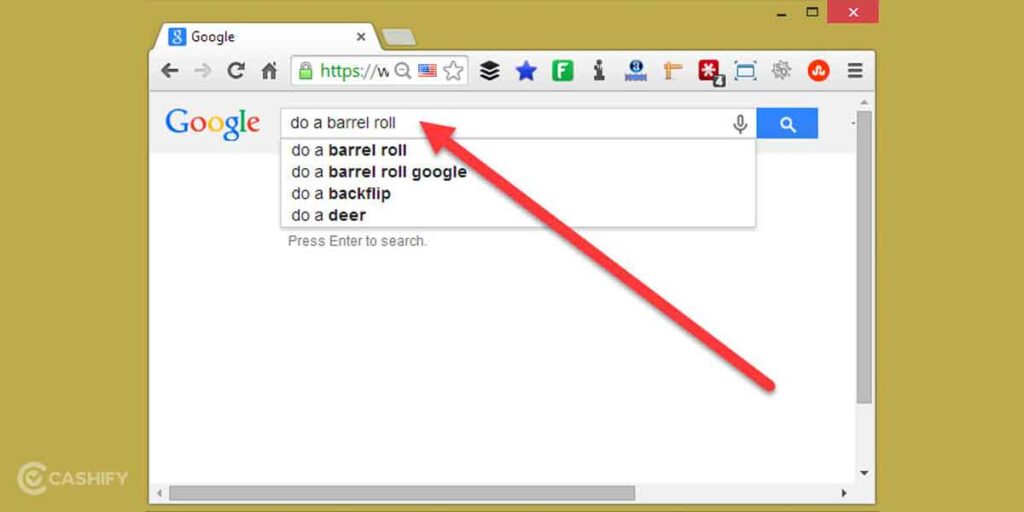
Before diving into the world of Google tricks, let me tell you a story. A few years ago, I was sitting with a friend when they said, “Hey, you should try searching for ‘do a barrel roll’ on Google.” Being a curious soul, I immediately typed it into the search bar. To my surprise, the entire search results page spun 360 degrees! It was then that I realized just how fun Google could be, and I knew I had to explore more of these hidden gems.
Today, I’m sharing over 40+ Google tricks that will have you laughing, learning, and exploring the fun side of searching. So, whether you’re bored, curious, or just looking for something to brighten your day, these tricks will show you the whimsical side of Google.
What Are Google Tricks Funny?
Before we get to the fun stuff, let’s quickly define what Google tricks are. These are hidden features or easter eggs built into Google search that are often designed for entertainment. They can range from simple, humorous animations to secret games and interactions that pop up when you type in specific keywords or phrases.
These tricks are a great way to kill time or just get a good laugh. And the best part? They don’t require any special apps or software—just a basic internet connection and your trusty Google search bar.
Google Tricks Funny You Need to Try
1. Do a Barrel Roll
Let’s start with one of the classics! If you type “do a barrel roll” into the Google search bar, the entire page will spin around. It’s a fun, simple trick that brings a smile every time. Want to see it for yourself? Go ahead, give it a try!
2. Askew/Tilt
If you want to see your search results take a little tilt, try typing “askew” or “tilt” into Google. The entire page will shift slightly to the side, giving you a playful and quirky experience. It’s an old trick, but still one of the funniest to try.
3. Google Gravity
No, Google Gravity isn’t about a serious physics lesson. Instead, if you type “Google gravity” into your search bar and hit “I’m Feeling Lucky,” everything on the page will fall down as if it’s been hit by gravity. Watch the search bar and results come crashing down for a good laugh!
4. Zerg Rush
Another fun trick involves typing “Zerg Rush” into the search bar. The search results page will be flooded with little ‘O’s that will gradually destroy the search results. Your goal? Try to click on them before they take over! It’s like a mini-game right in your browser.
5. Super Mario Bros.
Remember playing Super Mario on your console? You can relive a bit of that nostalgia by typing “Super Mario Bros” into Google and seeing the search results transform into a mini game. You can click through a level of Super Mario right on your screen. It’s simple, fun, and very nostalgic!
6. Pac-Man
For those of you who miss the classic Pac-Man arcade game, you can now play it right in your search bar. Simply type “Pac-Man” and Google will show you a playable version of the game. You can start navigating the maze and eating up all those dots while avoiding the ghosts.
7. Atari Breakout
For fans of the classic Atari games, typing “Atari Breakout” into the Google search bar will turn the image search results into a playable version of Breakout. It’s the perfect way to kill time with this addictive game.
8. Google in 1998
Want to take a trip down memory lane? Type “Google in 1998” into the search bar, and you’ll see what Google looked like back in its early days. It’s a fun blast from the past, showing how far the tech giant has come.
9. Blink HTML
This trick makes the text in your search results blink rapidly. Simply type “Blink HTML” and enjoy watching the words blink like they’re in a 90s-era website.
10. Google Sky
This one is for the astronomy buffs! Search for “Google Sky” and you’ll be able to explore the stars, planets, and galaxies. You can zoom in on constellations or even look at famous celestial bodies. It’s educational and visually stunning!
Hidden Games on Google
Google isn’t just about funny tricks; it also has a collection of hidden games that you can access with a few simple searches. Let’s explore some of the coolest hidden games that you can play directly in the browser.
11. Dinosaur Game (Offline Mode)
When you lose internet connectivity, many of us have seen the T-Rex dinosaur pop up on the screen. But did you know that you can play a simple game with it? Just press the space bar, and the dinosaur starts running. You’ll need to jump over cacti and avoid obstacles. It’s a fun way to kill time while waiting for your internet to come back!
12. Solitaire
Yes, Google has its own version of the classic card game Solitaire. To play it, just search for “Solitaire,” and Google will display the game. It’s the perfect solo activity when you need a break from work or studying.
13. Tic Tac Toe
Can’t find anyone to play Tic Tac Toe with? No worries—just search for it on Google! You can play it solo against the computer or invite a friend to join. It’s simple, nostalgic, and a quick way to relax.
14. Snake Game
If you miss playing the classic Snake game on old mobile phones, Google has got you covered. Type “Snake” into Google and start playing the game where you guide a snake to eat food and avoid crashing into itself.
Google Fun with Easter Eggs
Google is famous for hiding small surprises—called Easter eggs—in their search results. Here are a few of the most popular ones that will leave you amused.
15. The Answer to Life, the Universe, and Everything
If you type “the answer to life, the universe, and everything” into Google, you’ll get the answer: 42. This is a reference to The Hitchhiker’s Guide to the Galaxy, where the number 42 is revealed as the ultimate answer to the meaning of life.
16. Google Pac-Man
Earlier, we mentioned Google Pac-Man, but did you know there’s another way to access it? If you search for “Google Pac-Man,” Google will show a playable version of this classic arcade game, with all the usual ghosts and dots.
17. Google in Different Languages
Try typing “Google in Latin” or “Google in Klingon,” and Google will display the search page in those languages. It’s a fun way to explore different linguistic nuances of the platform.
How to Find More Google Tricks
Now that you’re familiar with some of the funniest Google tricks, you may be wondering how to find even more. Luckily, there are a few resources you can check out.
- Google Search Help: Google’s official help page often lists hidden features and tricks that you can try out.
- Google Easter Eggs: There are entire websites dedicated to compiling a list of Google’s best Easter eggs. Just search for “Google Easter Eggs” for endless fun!
- Google Play Store: Some Google apps come with their own set of fun tricks. Be sure to check out the Google Assistant for some hidden, humorous interactions.
Frequently Asked Questions
What are some of the funniest Google tricks to try?
Some of the funniest Google tricks include typing “do a barrel roll,” which makes your screen spin, or “askew,” which tilts the entire search page. You can also enjoy the “Zerg Rush” trick, where little O’s flood your search results, or “Google Gravity,” which makes everything on the page fall as if affected by gravity.
How can I play Google Pac-Man?
To play Google Pac-Man, simply search for “Pac-Man” on Google. The search results will show a playable version of this classic arcade game, allowing you to navigate the maze and eat dots while avoiding the ghosts.
Are Google tricks only available in the desktop version?
No! Most Google tricks are available both on desktop and mobile versions of Google, so you can enjoy them no matter where you’re browsing. However, some tricks may be more interactive on larger screens, such as the Google Gravity effect, which is best experienced on desktop.
How do I access Google’s hidden games?
To access Google’s hidden games, simply search for their names in the search bar. For example, typing “Tic Tac Toe,” “Snake,” or “Solitaire” will launch these games directly in your browser, letting you play them right away.
Can Google Easter eggs be accessed through Google Assistant?
Yes! Google Assistant has its own collection of fun Easter eggs and tricks. You can ask Google Assistant questions like, “What is the meaning of life?” or say “Play a game” to experience some fun interactions. You never know what quirky answer you might get!
Conclusion
In a world dominated by search engines that aim to answer questions and provide information, Google has found a unique way to inject fun into our daily browsing. From playful games to quirky Easter eggs, these 40+ Google tricks are perfect for anyone looking to add a little humor to their day. Whether you want to see your search results spin with a barrel roll, play a classic game of Pac-Man, or simply enjoy a fun Google Easter egg, the possibilities are endless.
The best part is, these tricks are free and easy to access—just type a few words into the search bar and watch Google bring a smile to your face. And for those who are looking for a deeper dive into Google’s playful side, there are always more hidden gems to discover. It’s like a secret playground built right into the search engine you use every day.
So next time you need a quick distraction or a laugh, try out one of these funny Google tricks. They remind us that sometimes, even in the world of technology and information, it’s nice to step back and enjoy a bit of whimsy. Google truly is more than just a search engine—it’s a place where fun and creativity live, right at your fingertips.