

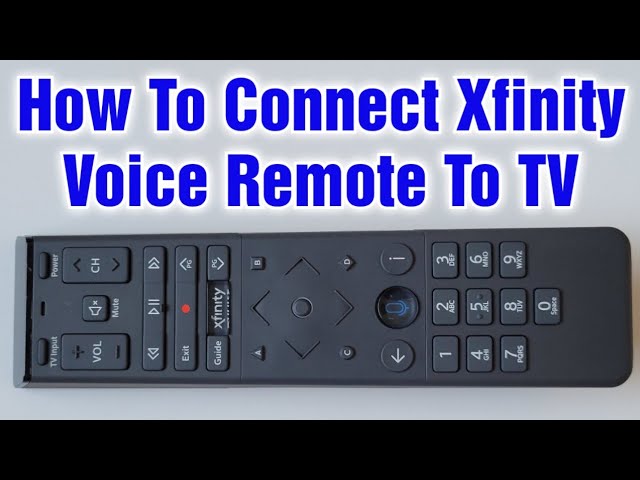
Today, we’ll guide you on how to reset your Xfinity remote and pair it again with your Xfinity streaming box or TV.
Xfinity is a well-known cable and internet provider in the US, and their hardware, including remotes, generally works great. However, sometimes the buttons may become unresponsive, causing the remote to stop working properly. Fortunately, resetting the Xfinity remote can usually resolve this issue. Before proceeding with a reset, ensure you’ve replaced the batteries, as low battery power could be the culprit. If that doesn’t solve the problem, keep reading for further steps.
When the remote stops working, it can be frustrating—especially when the device appears to be in perfect condition with no visible damage. The good news is that most issues can be easily fixed by performing a reset. Now, let’s dive into how to reset different Xfinity remotes that come with your streaming box.

Understanding the Xfinity Pair Remote
The Xfinity pair remote is more than just a remote control; it’s a versatile tool that brings control over a multitude of devices. Whether you have a cable box, sound system, or even your television, your Xfinity pair remote can be configured to handle all these tasks with ease. Pairing your remote might seem like a small task, but it’s vital for ensuring that all devices are correctly connected and controlled from a single point.
If you’ve ever faced the frustration of your remote not responding, then you understand the importance of pairing it correctly. Now, let’s get you back on track by guiding you through the process.
How to Reset Xfinity Remotes
There are different Xfinity remotes, and the reset process varies depending on the model you’re using. Follow the steps below to reset your specific Xfinity remote.
How to Reset Xfinity XR16 Voice Remote
- Install fresh batteries into your remote.
- Press and hold the I button and Home button simultaneously for about 5 seconds until the status light blinks.
- Now, press the Power, Left Arrow, and Volume Down buttons to complete the factory reset.
Pairing the XR16 Remote to Xfinity Flex TV Box
After resetting, pair the XR16 remote back to your Xfinity device:
- Plug in the TV Box and ensure it’s connected to your TV.
- Point the remote at the TV box and press the Voice button once.
- Follow the on-screen instructions to complete the pairing.
Pairing the XR16 Remote to Control TV or Audio Device
To control a smart TV or audio device like a home theater:
- Install fresh batteries.
- Press and hold the Voice button and say “Program Remote,” or go to Settings > Remote Settings > Voice Remote Programming.
- After pairing, press the Power button to turn off the TV.
- Turn the TV back on and check the volume and mute buttons.
How to Reset Xfinity XR11 Voice Remote
If your XR11 remote isn’t responsive, perform the factory reset:
- Press and hold the Setup button until the LED light changes from red to green.
- Press 9, 8, and 1 on the keypad. The LED should blink twice, indicating the reset is complete.
Pairing the XR11 Remote with Xfinity TV Box
To pair the XR11 remote:
- Ensure the remote is in the line of sight with your Xfinity TV Box.
- Press the A button and choose Remote Setup.
- Follow the on-screen prompts to pair the remote and control TV power and volume functions.
How to Reset Xfinity XR15 Voice Remote
To reset the XR15 remote:
- Press and hold the A and D buttons for 3 seconds until the LED changes from red to green.
- Press 9, 8, and 1 to reset the remote. The LED will blink three times to confirm.
Pairing the XR15 Remote with Xfinity X1 or Flex
To pair the XR15 with your Xfinity device:
- Turn your TV on and ensure the remote has fresh batteries.
- Press and hold the Xfinity and Mute buttons for 5 seconds until the LED turns green.
- Use the Remote Code Lookup Tool on your PC to find the TV brand code and enter it using the remote.
- After pairing, test the volume and mute functions. If it works, the remote is successfully paired. If not, try another code.
Xfinity Remote Codes
- Accurian: 11803
- Acer: 11339, 14143
- Admiral: 10463, 10093
- Advent: 10783, 10815, 10761, 10817
- Aiwa: 10701, 11914
- Akai: 10030, 10098, 10672, 11207, 11385, 11676, 11688, 11689, 11692, 11935, 11903, 10812, 11675, 10060, 10702
- Alaron: 10179, 10183, 10216
- Albatron: 10700, 10843
- A-Mark: 10003
- Ambassador: 10177
- America Action: 10180
- Ampro: 10751
- Anam: 10180
- Anam National: 10055
- AOC: 11590, 11365, 10030,
- Aomni: 11623
- Apex Digital: 10890, 11217, 10156, 10748, 10879, 10765, 10767, 11991
- Archer: 10003
- Astar: 11531, 11738
- Audiovox: 10875, 11284, 11951, 11952, 10003, 10451, 10180, 10092, 10623, 10802, 10846
- Aurora Systems: 10801
- Aventura: 10171
- Bell & Howell: 10154, 10016
- BenQ: 11032, 11315
- Bradford: 10180
- Brillian: 11007, 11257, 11258
- Brockwood: 10019
- Broksonic: 10236, 10463
- Bush: 10355
- Cadia: 11283
- Candle: 10056, 10186, 10030, 10046,
- Canon: 10793, 11396
- Carnivale: 10030
- Carver: 10054, 10170
- Casio: 10611, 11205
- CCE: 10217, 10329
- Celebrity: 10000
- Celera: 10765
- Changhong: 10765
- Cinego: 11986
- Citizen: 10030, 10046, 10056, 10060, 10186, 10280, 10561, 11669, 11671, 11672, 11928, 10092
- Clarion: 10180
- Classic: 11984
- Coby: 11531, 12017
- Commercial Solutions: 11447, 10047
- Compaq: 10749
- Concerto: 10056
- Contec: 10180
- Craig: 10180
- Crosley: 10054
- Crown: 10180
- CyberHome: 10794
- Cytron: 11326, 12003
- Daewoo: 10019, 11661, 10623, 10067, 10451, 10092, 10091, 10661, 10672, 11909, 11928, 10066
- Daytron: 10019
- Dell: 11178, 11403, 11264, 11080
- Delta: 11369
- Denon: 10145, 10511
- Denstar: 10628
- Diamond Vision: 11801, 11996
- Digistar: 11565
- Digital Lifestyles: 11765, 11822
- Digital Projection: 11482, 11725, 11726
- Dream Vision: 11297
- Dumont: 10017
- Durabrand: 10463, 10180, 10178, 10171
- Dwin: 10093, 10720, 10747, 10774
- Dynatech: 10049
- Dynex: 11463, 11780, 11785
- Eiki: 10735
- Electroband: 10000
- Electrohome: 10463, 10446, 11570, 11670, 11672, 11760, 11761
- Element: 11687
- Emerson: 10154, 11864, 10451, 10463, 10180, 10178, 10171, 11963, 11928, 11913, 11911, 11909, 11905, 11665, 10282, 10280, 10270, 10183, 10181, 10179, 10177, 10038, 10019, 10623, 11963, 10236
- Emprex: 11422, 11546, 11765
- Envision: 10030, 10813, 11365
- Epson: 11122, 11290
- Erae: 11222
- ESA: 10812, 10171, 11963
- Fisher: 10154, 10159
- Fujitsu: 10179, 10186, 10683, 10853,12008, 10809
- Funai: 10180, 10171, 10179, 11904, 11963, 11271
- Futuretech: 10180
- Gateway: 11755, 11001, 11756
- GE: 11447, 10047, 10051, 10451, 10178, 10021, 10027, 10029, 10055, 10135, 10279, 10282, 10747, 11907, 11919, 11922, 11347
- Gibralter: 10017, 10030, 10019
- Go Video: 10886, 11823, 11831
- GoldStar: 10178, 10030, 10002, 10019, 10032
- Goodmans: 10360
- Gradiente: 10392
- Grundig: 10683
- Grunpy: 10180, 10179
- Haier: 11034, 10178, 11265, 10768, 11009
- Hallmark: 10178
- Hanns.G: 11783
- Hannspree: 11348, 11745, 11783
- Harley Davidson: 10043, 10179, 11904
- Harman/Kardon: 10054, 10078
- Harvard: 10180, 10068
- Havermy: 10093
- H & B: 11366
- Helios: 10865
- Hello Kitty: 10451
- Hewlett Packard: 11494, 11502, 11088, 11089, 11101
- Hisense: 10748, 11660
- Hitachi: 11145, 10145, 12243, 12143, 11904, 11345, 10797, 10737, 10724, 10723, 10413, 10279, 10227, 10173, 10151, 10097, 10095, 10056, 10038, 10032, 10016, 11960
- Hyundai: 10849, 11219, 11294
- I-Inc: 11746
- iLo: 11286, 11603, 11665, 11684
- Infinity: 10054
- InFocus: 10736, 10738, 10741, 10781
- Initial: 11990, 11603
- Insignia: 10171, 11780, 11892, 11204, 11326, 11517, 11641, 11963, 12002
- Inteq: 10017
- IX: 10877
- Janeil: 10046
- JBL: 10054
- JCB: 10000
- Jensen: 10761, 10050, 10815, 10817
- JVC: 10053, 10036, 10160, 10169, 10731, 11349, 11253
- Kamp: 10216
- Kawasho: 10216, 10308
- Kaypani: 10052
- KDS: 11687
- KEC: 10180
- Kenwood: 10030, 10019
- KLH: 10765, 10767
- Kloss: 10024, 10046, 10078
- Knoll Systems: 10781
- Konka: 10628, 10632, 10638, 10707, 11385, 11831, 11939
- Kost: 11262, 11483
- Kreisen: 10876, 11474
- KTV: 10180, 10030, 10183, 10217
- LG: 11265, 10178, 10700, 10442, 10856, 11178, 11530, 11637, 11758, 11934, 11993
- LiteOn: 11088
- LXI: 10047, 10054, 10154, 10156
- Magnavox: 11454, 11866, 10054, 10030, 10706, 11990, 11963, 11913, 11904, 11525, 11365, 11198, 11254, 10386, 10802, 10230, 10187, 10186, 10179, 10096, 10036, 10028, 10024
- Magnin: 11907
- Majestic: 10015, 10016
- Marantz: 10054, 10030, 10704, 10854, 10855, 11398, 11554
- Matsushita: 10250, 10650
- Maxent: 11755, 11714, 11757
- MB Quart: 11868
- Megapower: 10700
- Megatron: 10178, 10145, 10003
- Memorex: 10154, 10463, 10150, 10178, 10016, 10179, 10877, 11570, 11911, 11920
- MGA: 10150, 10178, 10030, 10019
- Micro: 11436
- Midland: 10047, 10017, 10051, 10032, 10135, 10747
- Mintek: 11990, 11603
- Minutz: 10021
- Mitsubishi: 11250, 10093, 10150, 10178, 10014, 10019, 10098, 10155, 10331, 10358, 10592, 10836, 10868, 11278, 11392
- Monivision: 10700, 10843
- Motorola: 10093, 10055, 10835
- Moxell: 10835
- MTC: 10060, 10030, 10019, 10049, 10056, 10091, 10216
- Multitech: 10180, 10049, 10217
- NAD: 10156, 10178, 10866, 10037
- Nakamichi: 11493
- Naxa: 11998
- NEC: 10030, 10019, 10036, 10056, 10170, 10434, 10455, 10497, 10882, 11398, 11704, 11797, 12026
- NetTV: 11755
- Nikko: 10178, 10030, 10092
- Niko: 11581
- Noblex: 10430
- Norcent: 10748, 10824, 11089, 11365
- Norwood Micro: 11286, 11296, 11303
- Noshi: 10018
- NTC: 10092
- NuVision: 11657
- Olevia: 11610, 11144, 11240, 11331
- Olympus: 11342
- Onwa: 10180
- Optimus: 10154, 10250, 10166, 10650, 11913
- Optoma: 10887, 11348, 11674
- Optonica: 10093, 10165
- Orion: 10236, 10463, 11463, 10179, 11905, 11911
- Panasonic: 10250, 10051, 10055, 10650, 11291, 11941, 10162, 10226, 10375, 11310, 11410, 11919
- Penney: 10047, 10156, 10051, 10060, 10178, 10030, 11919, 11907, 10747, 10309, 10149, 10135, 10110, 10032, 10027, 10021
- Petters: 11523
- Philco: 10054, 10030, 10019, 10020, 10028, 10096, 10302
- Philips: 11454, 10054, 10037, 10690, 11483
- Pilot: 10030, 10019
- Pioneer: 10166, 10679, 10866, 10038, 10172, 11398
- Planar: 11496
- Polaroid: 10765, 12063, 12002, 11991, 11962, 11769, 11767, 11766, 11762, 11687, 11565, 11538, 11523, 11385, 11341, 11328, 11327, 11326, 11316, 11314
- Portland: 10092, 10019
- Prima: 10761, 10783, 10815, 10817, 11389, 11785, 11933
- Princeton: 10700, 10717
- Prism: 10051
- Proscan: 11447, 10178, 10047, 11347, 10466, 10747, 11922
- Proton: 10178, 10003, 10031, 10052, 10466
- Protron: 11320, 11323
- Proview: 10835, 11687
- Pulsar: 10017, 10019
- Puneet: 11546
- Pvision: 11222
- Quasar: 10250, 10051, 10055, 10165, 10650, 10219, 11919
- RadioShack: 10047, 10154, 10180, 10178, 10030, 10165
- RCA: 11447, 10047, 12002, 11953, 11948, 11922, 11919, 11907, 11781, 10747, 10278, 10254, 10135, 10090, 10679, 11047, 11147, 11247, 11347, 11547, 11958, 12002, 10038, 10029, 10019, 10018
- Realistic: 10154, 10180, 10178, 10030, 10165, 10019, 10032, 10056
- RevolutionHD: 11623
- Rhapsody: 10183, 10216
- Runco: 10017, 10030, 10497, 10612
- Sampo: 10030, 11755, 10032, 10052, 10100, 10110, 11597
- Samsung: 10812, 10060, 10702, 10178, 10030, 11959, 11632, 11575, 11060, 10814, 10766, 10587, 10482, 10427, 10408, 10329, 10217, 10056, 10032, 10019, 11903
- Sansui: 10463, 11409, 11904, 11911, 11935
- Sanyo: 10154, 10088, 10146, 10159, 10232, 10484, 10735, 10798, 10799, 11907
- Sceptre: 10878, 11217, 11360, 11599
- Scimitsu: 10019
- Scotch: 10178
- Scott: 10236, 10180, 10178, 10019, 10179, 10309, 11711
- Sears: 10047, 10054, 10154, 10156, 10178, 10171, 10015, 10056, 10146, 10149, 10159, 10168, 10179, 10747, 11007, 11904
- Seleco: 10737, 11297
- Sharp: 10093, 10153, 10165, 10386, 11602, 10398, 10491, 10851
- Sharper Image: 11950
- Sheng Chia: 10093
- Sherwood: 11399
- Shogun: 10019
- Signature: 10016
- Signet: 10800, 10844, 11262
- SIM2 Multimedia: 11297
- Simpson: 10186, 10187
- Skyworth: 11799
- Solarism: 11220
- Sole: 10813, 11031, 11366, 11377, 11483, 11530, 11623, 12075
- Sony: 11100, 10000, 10011, 10273, 10353, 10834, 11317, 11400, 11685, 11786, 11791, 11904, 11925
- Soundesign: 10180, 10178, 10179, 10186
- Sova: 11320, 11952
- Soyo: 11546, 11746, 11824, 11826, 11828, 11830, 11831
- Spectricon: 10003, 10137
- Spectroniq: 11687
- Squareview: 10171
- SSS: 10180, 10019
- Starlite: 10180
- Studio Experience: 10843
- SunBrite: 11420, 11435
- Superscan: 10093, 10864
- Supre-Macy: 10046
- Supreme: 10000
- SVA: 10748, 10587, 10768, 10865, 10870, 10871, 10872
- Sylvania: 11864, 10054, 10030, 10171, 11271, 10020, 10028, 10065, 10096, 11314, 11665, 11963
- Symphonic: 10180, 10171, 11904, 11913
- Syntax: 11144, 11240, 11331, 11610
- Tandy: 10093, 10218
- Tatung: 10003, 10049, 10055, 11101, 11286, 11287, 11288, 11361, 11503, 11756
- Technics: 10250, 10051
- Technol Ace: 10179
- Techview: 10847, 12004
- Techwood: 10051, 10003, 10056
- Teknika: 10054, 10180, 10150, 10060, 10092, 10016, 10019, 10056, 10175, 10179, 10186, 10312
- Telefunken: 10702, 10056, 10101
- Telemagic: 10735
- Tera: 10031
- Thomas: 11904
- Thomson: 10209, 10210, 10625
- TMK: 10178, 10056, 10177
- TNCi: 10017
- Toshiba: 10154, 11256, 10156, 11265, 10060, 10036, 10650, 10845, 10149, 10736, 10832, 11343, 11369, 11704, 11935, 11156, 11356, 11656
- TruTech: 11723, 12066
- TVS: 10463 11685, 11786, 11791, 11904, 11925
- Ultra: 10391, 11323
- Universal: 10027
- US Logic: 11286, 11303
- Vector Research: 10030
- Venturer: 11865
- VEOS: 11007
- Victor: 10053
- Video Concepts: 10098
- Vidikron: 10054, 10242, 11398, 11629
- Vidtech: 10178, 10019, 10036
- Viewsonic: 11755, 12014, 10724, 10775, 10797, 10857, 10864, 10885, 11330, 11342, 11578, 11627
- Viking: 10046, 10312
- Viore: 11207, 11684, 11811
- Visart: 11336
- Vizio: 11758, 10864, 10885, 11756
- Wards: 10054, 10178, 10030, 10016, 10019, 10020, 10021, 10027, 10028, 10029, 10056, 10096
- Waycon: 10156
- Westinghouse: 10000, 10451, 10885, 10889, 10890, 11282, 11577
- White Westinghouse: 10463, 10623, 11909
- WinBook: 11381, 11503
- Wyse: 11365
- Xoceco: 11469
- Yamaha: 10030, 10019, 10797, 11407
- Zonda: 10003
- Zenith: 10017, 10463, 11265, 10178, 10092, 10016, 11904, 11909
Frequently Asked Questions
How do I reset my Xfinity remote to factory settings?
To reset your Xfinity remote, press and hold the Setup button (for XR11) or the I and Home buttons (for XR16) until the status light blinks. Then follow the on-screen instructions to complete the reset. Make sure to have fresh batteries installed before starting.
What should I do if my Xfinity remote isn’t working after a factory reset?
If your remote isn’t functioning after a reset, ensure that the batteries are fresh and properly inserted. Try re-pairing the remote with your Xfinity device by following the pairing instructions for your remote model.
How do I pair my Xfinity remote with my Xfinity TV Box or Flex device?
To pair the remote, plug in your TV box, point the remote at the device, and follow the on-screen instructions after pressing the Voice button or using the Remote Setup option in the settings.
Can I use my Xfinity remote to control my TV’s power and volume?
Yes, after pairing your Xfinity remote with your TV, you can use it to control the power, volume, and other functions. Follow the pairing process in your remote settings to enable these controls.
Why isn’t my Xfinity remote responding after the factory reset?
If the remote is unresponsive after resetting, double-check the battery installation and ensure they are fresh. If issues persist, repeat the reset process, or consult the remote’s troubleshooting guide for further steps.
conclusion
Factory resetting and pairing your Xfinity remote is a straightforward process that can help resolve many issues, such as unresponsive buttons or difficulties with device pairing. By following the specific steps for your remote model, whether it’s the XR16, XR11, or XR15, you can easily reset your remote and re-establish a connection with your Xfinity TV Box or Flex device. Always make sure to use fresh batteries and carefully follow the pairing instructions to ensure your remote functions properly. If you continue to face issues, troubleshooting steps or contacting Xfinity support can help you resolve any lingering problems.