

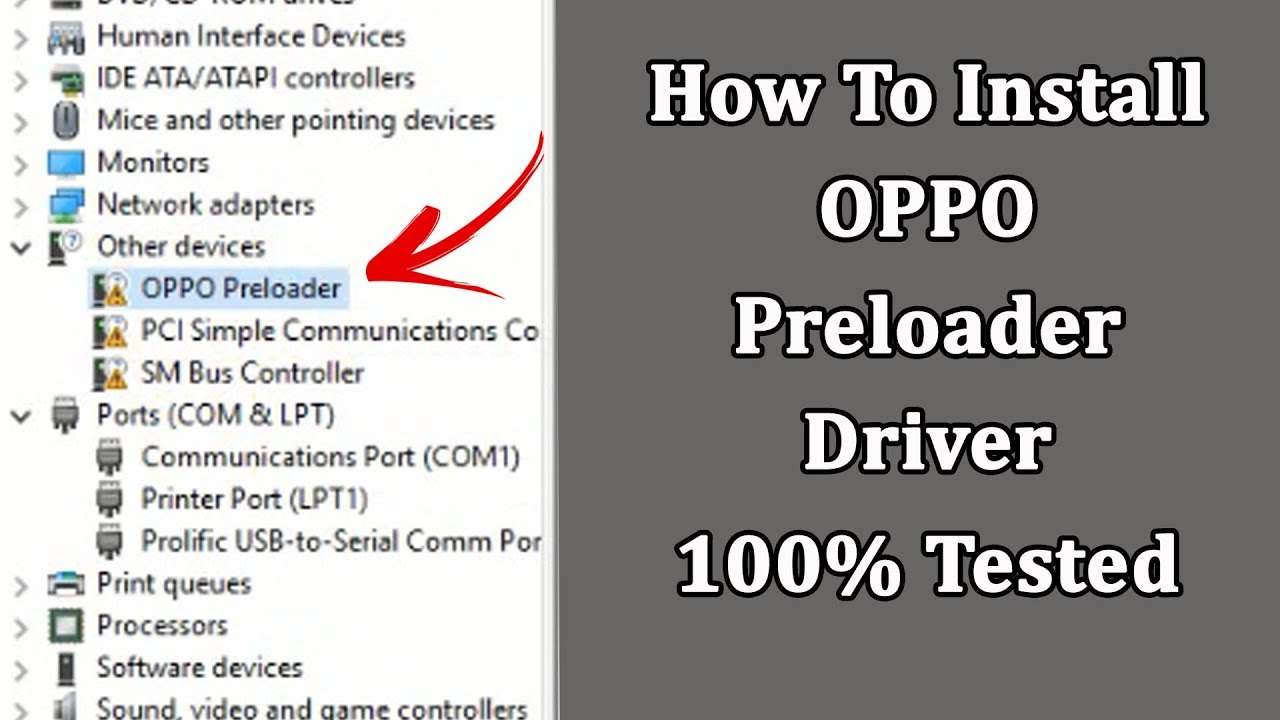
In the vast world of smartphones, Oppo has emerged as one of the leading brands. Its user-friendly features, stylish designs, and robust performance have attracted millions of users worldwide. However, when dealing with devices like Oppo, certain technical issues may arise, one of which is the need for the Oppo Preloader Driver.
You might be wondering, “What is a preloader driver, and why do I need it for my Oppo device?” Well, allow me to take you on a journey through the world of preloader drivers and how they can be crucial for maintaining the smooth functionality of your Oppo smartphone.
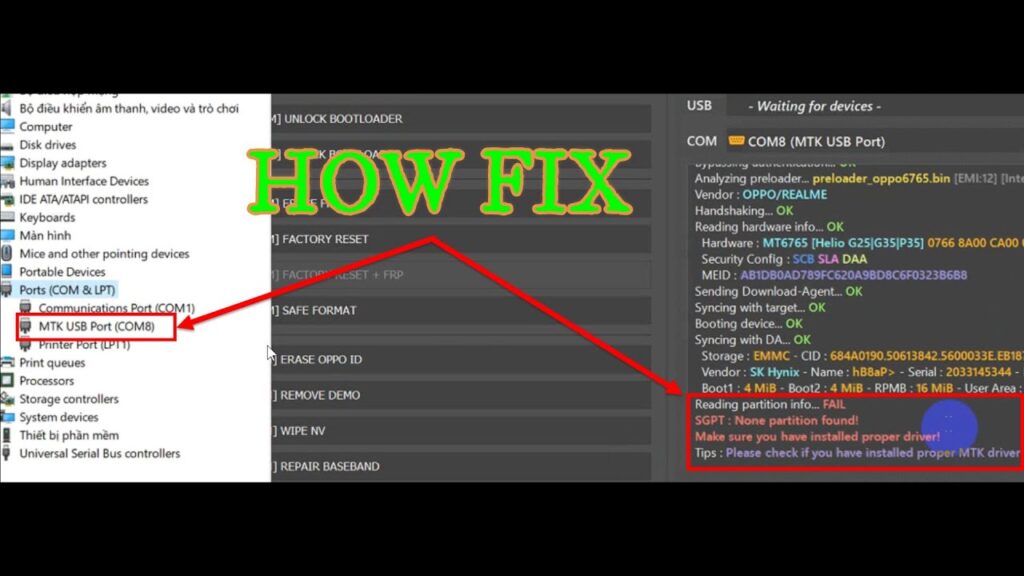
The Oppo Preloader Driver is a vital component that facilitates communication between your Oppo device and your computer. Without it, you may face issues like your device not being recognized by your PC, or it may fail to enter certain modes like fastboot or recovery. So, whether you’re a tech enthusiast or just someone trying to troubleshoot their device, understanding the importance of the preloader driver can save you time and frustration.
What is an Oppo Preloader Driver?
The Oppo Preloader Driver is a specialized software that enables your computer to communicate with your Oppo device, particularly when it is in a preboot mode or requires firmware updates. It is essentially a bridge between the operating system of your phone and your PC, allowing the two to synchronize data and commands.
Now, you might be wondering, “Why do I need this driver in the first place?” Well, it’s simple. If you’re trying to flash firmware, update your device’s software, or perform certain repairs, having the Oppo Preloader Driver installed on your computer is crucial. Without it, your PC might not be able to recognize your device, thus causing the whole process to fail.
Why Should You Install the Oppo Preloader Driver?
Installing the Oppo Preloader Driver opens up a world of possibilities for users looking to root, unlock, or troubleshoot their Oppo phones. Here are a few reasons why you should consider installing it:
- Flashing Firmware: When updating or changing the software on your Oppo phone, having the Oppo Preloader Driver ensures your phone is detected by the PC, making the process smooth.
- Device Recognition: Without this driver, your Oppo phone may fail to show up on your computer when you connect it via USB, which can be frustrating if you’re trying to transfer files or perform system-level tasks.
- Troubleshooting: If you are encountering issues like boot loops or bricked devices, the Oppo Preloader Driver is often the first step in fixing the problem. It helps you connect your device to tools that can fix the system.
- Unlocking Bootloader: The preloader driver is often needed to unlock your phone’s bootloader, a necessary step for rooting or installing custom ROMs on Oppo devices.
Here is a table for Oppo Preloader Driver Compatibility:
| Operating System | Windows XP | Windows 7 | Windows 8 | Windows 8.1 | Windows 10 |
|---|---|---|---|---|---|
| Oppo Preloader Driver Supported Phones | |||||
| Oppo A1 | ✔ | ✔ | ✔ | ✔ | ✔ |
| Oppo A1k | ✔ | ✔ | ✔ | ✔ | ✔ |
| Oppo A3 | ✔ | ✔ | ✔ | ✔ | ✔ |
| Oppo A3s | ✔ | ✔ | ✔ | ✔ | ✔ |
| Oppo A5 | ✔ | ✔ | ✔ | ✔ | ✔ |
| Oppo A5s | ✔ | ✔ | ✔ | ✔ | ✔ |
| Oppo A7 | ✔ | ✔ | ✔ | ✔ | ✔ |
| Oppo A7n | ✔ | ✔ | ✔ | ✔ | ✔ |
| Oppo A8 | ✔ | ✔ | ✔ | ✔ | ✔ |
| Oppo A9 | ✔ | ✔ | ✔ | ✔ | ✔ |
| Oppo A9x | ✔ | ✔ | ✔ | ✔ | ✔ |
| Oppo A12 | ✔ | ✔ | ✔ | ✔ | ✔ |
| Oppo A15 | ✔ | ✔ | ✔ | ✔ | ✔ |
| Oppo A31 | ✔ | ✔ | ✔ | ✔ | ✔ |
| Oppo A32 | ✔ | ✔ | ✔ | ✔ | ✔ |
| Oppo A33 | ✔ | ✔ | ✔ | ✔ | ✔ |
| Oppo A33EX | ✔ | ✔ | ✔ | ✔ | ✔ |
| Oppo A35 | ✔ | ✔ | ✔ | ✔ | ✔ |
| Oppo A37 | ✔ | ✔ | ✔ | ✔ | ✔ |
| Oppo A37F | ✔ | ✔ | ✔ | ✔ | ✔ |
| Oppo A39 | ✔ | ✔ | ✔ | ✔ | ✔ |
| Oppo A52 | ✔ | ✔ | ✔ | ✔ | ✔ |
| Oppo A53 | ✔ | ✔ | ✔ | ✔ | ✔ |
| Oppo A53s | ✔ | ✔ | ✔ | ✔ | ✔ |
| Oppo A54 | ✔ | ✔ | ✔ | ✔ | ✔ |
| Oppo A55 | ✔ | ✔ | ✔ | ✔ | ✔ |
| Oppo A57 | ✔ | ✔ | ✔ | ✔ | ✔ |
| Oppo A59 | ✔ | ✔ | ✔ | ✔ | ✔ |
| Oppo A59M | ✔ | ✔ | ✔ | ✔ | ✔ |
| Oppo A66 | ✔ | ✔ | ✔ | ✔ | ✔ |
| Oppo A71 | ✔ | ✔ | ✔ | ✔ | ✔ |
| Oppo A72 | ✔ | ✔ | ✔ | ✔ | ✔ |
| Oppo A73 | ✔ | ✔ | ✔ | ✔ | ✔ |
| Oppo A74 | ✔ | ✔ | ✔ | ✔ | ✔ |
| Oppo A77 | ✔ | ✔ | ✔ | ✔ | ✔ |
| Oppo A79 | ✔ | ✔ | ✔ | ✔ | ✔ |
| Oppo A83 | ✔ | ✔ | ✔ | ✔ | ✔ |
| Oppo A91 | ✔ | ✔ | ✔ | ✔ | ✔ |
| Oppo A92 | ✔ | ✔ | ✔ | ✔ | ✔ |
| Oppo A93 | ✔ | ✔ | ✔ | ✔ | ✔ |
| Oppo A94 | ✔ | ✔ | ✔ | ✔ | ✔ |
| Oppo A95 | ✔ | ✔ | ✔ | ✔ | ✔ |
| Oppo Ace2 | ✔ | ✔ | ✔ | ✔ | ✔ |
| Oppo AX5 | ✔ | ✔ | ✔ | ✔ | ✔ |
| Oppo AX5s | ✔ | ✔ | ✔ | ✔ | ✔ |
| Oppo AX7 | ✔ | ✔ | ✔ | ✔ | ✔ |
| Oppo AX7 Pro | ✔ | ✔ | ✔ | ✔ | ✔ |
| Oppo F1 | ✔ | ✔ | ✔ | ✔ | ✔ |
| Oppo F1 Plus | ✔ | ✔ | ✔ | ✔ | ✔ |
| Oppo F1s | ✔ | ✔ | ✔ | ✔ | ✔ |
| Oppo F1s Plus | ✔ | ✔ | ✔ | ✔ | ✔ |
| Oppo F3 | ✔ | ✔ | ✔ | ✔ | ✔ |
| Oppo F3 Plus | ✔ | ✔ | ✔ | ✔ | ✔ |
| Oppo F5 | ✔ | ✔ | ✔ | ✔ | ✔ |
| Oppo F5 Youth | ✔ | ✔ | ✔ | ✔ | ✔ |
| Oppo F6 | ✔ | ✔ | ✔ | ✔ | ✔ |
| Oppo F7 | ✔ | ✔ | ✔ | ✔ | ✔ |
| Oppo F7 Youth | ✔ | ✔ | ✔ | ✔ | ✔ |
| Oppo F9 | ✔ | ✔ | ✔ | ✔ | ✔ |
| Oppo F9 Pro | ✔ | ✔ | ✔ | ✔ | ✔ |
| Oppo F11 | ✔ | ✔ | ✔ | ✔ | ✔ |
| Oppo F11 Pro | ✔ | ✔ | ✔ | ✔ | ✔ |
| Oppo F11 Pro Marvel Edition | ✔ | ✔ | ✔ | ✔ | ✔ |
| Oppo F15 | ✔ | ✔ | ✔ | ✔ | ✔ |
| Oppo F17 | ✔ | ✔ | ✔ | ✔ | ✔ |
| Oppo F17 Pro | ✔ | ✔ | ✔ | ✔ | ✔ |
| Oppo F19 | ✔ | ✔ | ✔ | ✔ | ✔ |
| Oppo F19 Pro | ✔ | ✔ | ✔ | ✔ | ✔ |
| Oppo Find | ✔ | ✔ | ✔ | ✔ | ✔ |
| Oppo Find 5 | ✔ | ✔ | ✔ | ✔ | ✔ |
| Oppo Find 5 Mini | ✔ | ✔ | ✔ | ✔ | ✔ |
| Oppo Find 7 | ✔ | ✔ | ✔ | ✔ | ✔ |
| Oppo Find 7 Mini | ✔ | ✔ | ✔ | ✔ | ✔ |
| Oppo Find 7A | ✔ | ✔ | ✔ | ✔ | ✔ |
| Oppo Find R815 | ✔ | ✔ | ✔ | ✔ | ✔ |
| Oppo Find X | ✔ | ✔ | ✔ | ✔ | ✔ |
| Oppo Find X Lamborghini Edition | ✔ | ✔ | ✔ | ✔ | ✔ |
| Oppo Find X2 | ✔ | ✔ | ✔ | ✔ | ✔ |
| Oppo Find X2 Pro | ✔ | ✔ | ✔ | ✔ | ✔ |
| Oppo Find X3 | ✔ | ✔ | ✔ | ✔ | ✔ |
| Oppo Find X3 Pro | ✔ | ✔ | ✔ | ✔ | ✔ |
| Oppo Joy | ✔ | ✔ | ✔ | ✔ | ✔ |
| Oppo Joy Plus | ✔ | ✔ | ✔ | ✔ | ✔ |
| Oppo Joy 3 | ✔ | ✔ | ✔ | ✔ | ✔ |
| Oppo K1 | ✔ | ✔ | ✔ | ✔ | ✔ |
| Oppo K2 | ✔ | ✔ | ✔ | ✔ | ✔ |
| Oppo K3 | ✔ | ✔ | ✔ | ✔ | ✔ |
| Oppo K7 | ✔ | ✔ | ✔ | ✔ | ✔ |
| Oppo K9 | ✔ | ✔ | ✔ | ✔ | ✔ |
| Oppo Mirror 3 | ✔ | ✔ | ✔ | ✔ | ✔ |
| Oppo Mirror 5 | ✔ | ✔ | ✔ | ✔ | ✔ |
| Oppo Mirror 5s | ✔ | ✔ | ✔ | ✔ | ✔ |
| Oppo N1 | ✔ | ✔ | ✔ | ✔ | ✔ |
| Oppo N1 Mini | ✔ | ✔ | ✔ | ✔ | ✔ |
| Oppo N3 | ✔ | ✔ | ✔ | ✔ | ✔ |
| Oppo Reno | ✔ | ✔ | ✔ | ✔ | ✔ |
| Oppo Reno 2 | ✔ | ✔ | ✔ | ✔ | ✔ |
| Oppo Reno 2 Z | ✔ | ✔ | ✔ | ✔ | ✔ |
| Oppo Reno 3 | ✔ | ✔ | ✔ | ✔ | ✔ |
| Oppo Reno 3 Pro | ✔ | ✔ | ✔ | ✔ | ✔ |
| Oppo Reno 4 | ✔ | ✔ | ✔ | ✔ | ✔ |
| Oppo Reno 4 Pro | ✔ | ✔ | ✔ | ✔ | ✔ |
| Oppo Reno 5 | ✔ | ✔ | ✔ | ✔ | ✔ |
| Oppo Reno 5 5G | ✔ | ✔ | ✔ | ✔ | ✔ |
| Oppo Reno 6 | ✔ | ✔ | ✔ | ✔ | ✔ |
| Oppo Reno 7 | ✔ | ✔ | ✔ | ✔ | ✔ |
| Oppo Reno 8 | ✔ | ✔ | ✔ | ✔ | ✔ |
| Oppo Reno 9 | ✔ | ✔ | ✔ | ✔ | ✔ |
| Oppo Realme 1 | ✔ | ✔ | ✔ | ✔ | ✔ |
| Oppo Realme 2 | ✔ | ✔ | ✔ | ✔ | ✔ |
| Oppo Realme 2 Pro | ✔ | ✔ | ✔ | ✔ | ✔ |
| Oppo Realme 3 | ✔ | ✔ | ✔ | ✔ | ✔ |
| Oppo Realme 3 Pro | ✔ | ✔ | ✔ | ✔ | ✔ |
| Oppo Realme 5 | ✔ | ✔ | ✔ | ✔ | ✔ |
| Oppo Realme 5 Pro | ✔ | ✔ | ✔ | ✔ | ✔ |
| Oppo Realme 6 | ✔ | ✔ | ✔ | ✔ | ✔ |
| Oppo Realme 6 Pro | ✔ | ✔ | ✔ | ✔ | ✔ |
| Oppo Realme 7 | ✔ | ✔ | ✔ | ✔ | ✔ |
| Oppo Realme 7 Pro | ✔ | ✔ | ✔ | ✔ | ✔ |
| Oppo Realme 8 | ✔ | ✔ | ✔ | ✔ | ✔ |
| Oppo Realme 8 Pro | ✔ | ✔ | ✔ | ✔ | ✔ |
| Oppo Realme 9 | ✔ | ✔ | ✔ | ✔ | ✔ |
| Oppo Realme 10 | ✔ | ✔ | ✔ | ✔ | ✔ |
| Oppo Realme 11 | ✔ | ✔ | ✔ | ✔ | ✔ |
| Oppo Realme GT | ✔ | ✔ | ✔ | ✔ | ✔ |
| Oppo Realme GT 5G | ✔ | ✔ | ✔ | ✔ | ✔ |
| Oppo Realme GT 2 | ✔ | ✔ | ✔ | ✔ | ✔ |
| Oppo Realme GT 2 Pro | ✔ | ✔ | ✔ | ✔ | ✔ |
| Oppo Realme X | ✔ | ✔ | ✔ | ✔ | ✔ |
| Oppo Realme X2 | ✔ | ✔ | ✔ | ✔ | ✔ |
| Oppo Realme X2 Pro | ✔ | ✔ | ✔ | ✔ | ✔ |
Download Oppo Preloader Driver (Latest Version)
Latest Oppo Preloader Driver – Compatible with More Oppo Devices
In this post, we’re providing the latest version of the Oppo Preloader Driver, now with support for a wider range of Oppo smartphones. The driver is compatible with both Windows 32-bit and Windows 64-bit operating systems. We’ve also previously shared the Qualcomm HS QLoader Driver, which offers similar functionality to the Oppo Preloader Driver but is limited to Qualcomm-based devices. If you’re looking for the specific driver for your Oppo phone, you can download the Oppo Preloader Driver from the links provided.
Oppo Preloader Driver Details:
- File Name: QcomMtk_Driver_Setup_V2.0.1.1.rar
- File Size: 16MB
Once you download the driver, installing it on your Windows PC is a straightforward process. Below, we’ve included an easy-to-follow installation guide to help you through the setup.
Before proceeding, ensure your computer is running a compatible version of Windows OS.
How to Install the Oppo Preloader Driver
The driver is packaged as an executable file, making it easy to install on your Windows computer. After installation, you’ll be able to use various tools that require the Oppo Preloader Driver.
Follow these steps to install the Oppo Preloader Driver:
- Download the latest Oppo Preloader Driver from the link provided.
- Extract the compressed file to your computer.
- Run the installer by double-clicking on
QcomMtk_Driver_Setup_V2.0.1.1.exe. - In the setup wizard, click Next to continue. The installation will take just a few seconds.
- When prompted to Trust the Source, click Install to proceed with the installation.
- Once the installation is complete, click Finish.
You’ve successfully installed the Oppo Preloader Driver on your PC! Now you can use it to flash stock ROMs and recover bricked Oppo phones.
For more tools and driver guides, stay connected with YTECHB.
Download Link: [MediaFire]
Why Do You Need the Right Drivers for Your Oppo Device?
When you think about it, a phone is more than just a device for calling and texting. It’s a sophisticated machine that requires specific drivers to function properly when connected to a PC. This is why having the right Oppo Preloader Driver is crucial – it ensures that all the complex tasks you want to perform on your device can be executed smoothly and without issue.
Whether you’re flashing new firmware, troubleshooting problems, or modifying your device for advanced uses like rooting, the Oppo Preloader Driver is your first step in ensuring compatibility between your Oppo device and your PC.
Frequently Asked Questions
What is the Oppo Preloader Driver?
The Oppo Preloader Driver is a software tool that allows your computer to detect and communicate with Oppo smartphones in recovery or boot mode. It is essential for flashing custom ROMs, performing software repairs, or rooting Oppo devices. This driver ensures that your phone connects properly with Windows for tasks such as firmware updates or unlocking the bootloader.
How Do I Install the Oppo Preloader Driver on Windows?
To install the Oppo Preloader Driver on Windows, first, download the driver from a trusted source. Afterward, run the setup file and follow the on-screen instructions. If the driver doesn’t install automatically, you can manually install it through the Device Manager by selecting the “Update Driver” option and pointing it to the downloaded driver folder.
What Are the Benefits of Using the Oppo Preloader Driver?
The main benefits of using the Oppo Preloader Driver include the ability to interact with your Oppo phone during critical operations like firmware flashing, bootloader unlocking, and software recovery. It ensures your device is correctly recognized by your PC, facilitating smooth communication between the phone and computer for these operations.
What Should I Do If My Computer Doesn’t Detect My Oppo Phone After Installing the Preloader Driver?
If your computer doesn’t detect your Oppo phone, try the following troubleshooting steps:
- Restart your computer and phone.
- Ensure that USB debugging is enabled on your Oppo device.
- Try using a different USB cable or port.
- Reinstall the Oppo Preloader Driver through Device Manager.
- Check if the driver version is compatible with your version of Windows.
Can I Use the Oppo Preloader Driver on Other Android Devices?
The Oppo Preloader Driver is specifically designed for Oppo smartphones, and it may not work optimally with other Android devices. For devices from other manufacturers, you should use their respective drivers, like the Samsung USB driver for Samsung phones or the Qualcomm USB driver for Qualcomm-based devices.
conclusion
The Oppo Preloader Driver is an essential tool for users who wish to connect their Oppo devices to their computers for firmware updates, flashing, or troubleshooting. It enables the PC to recognize the device properly, facilitating tasks like software installation, data recovery, and system repairs.
By following the steps provided in this guide, users can install the Oppo Preloader Driver easily and efficiently, ensuring their devices can interact smoothly with PC utilities. Understanding the importance of this driver will help users avoid common connection issues and enhance their experience when working with Oppo devices.
Whether you’re a beginner or an experienced user, this guide offers all the necessary details to resolve issues related to connectivity and USB drivers, ensuring a hassle-free process for managing your Oppo device.