

Hisense TV Remote Codes: Are you in search of universal remote codes for your Hisense TV? You’ve come to the right place! In this guide, you’ll find a list of Hisense universal remote codes and instructions on how to program them to control your TV.
Universal remotes have become an essential tool, especially when your TV’s original remote is lost or damaged. Hisense is a leading smart TV brand in the United States, known for offering a wide range of high-quality TVs at budget-friendly prices. Regardless of the TV model, the remote is a small yet vital device for navigating and controlling your TV.
If you’ve misplaced your Hisense TV remote, a universal remote is your best solution. Available in various brands, universal remotes all serve the same purpose, but the pairing method for each brand can differ. However, the one thing all universal remotes have in common is the set of codes used to program them.
Universal Remote Codes for Hisense TV
Here’s a table with the provided 3-digit and 4-digit codes for Hisense TVs:
| 3-Digit Codes for Hisense TV | 4-Digit Codes for Hisense TV |
|---|---|
| 759 | 0009 |
| 042 | 0073 |
| 237 | 0145 |
| 073 | 0156 |
| 081 | 0182 |
| 182 | 0208 |
| 216 | 0216 |
| 004 | 0227 |
| 021 | 0508 |
| 031 | 0696 |
| 072 | 0748 |
| 198 | 0753 |
| 236 | 0780 |
| 251 | 0821 |
| 268 | 0848 |
| 363 | 1170 |
| 387 | 0178 |
| 419 | 0706 |
| 442 | 0748 |
| 619 | 0818 |
| 630 | 0885 |
| 631 | 1042 |
| 705 | 1138 |
| 752 | 1204 |
| 1237 | |
| 1314 | |
| 1602 | |
| 1660 | |
| 1756 | |
| 2049 | |
| 2098 | |
| 2183 | |
| 2355 | |
| 2360 | |
| 2419 | |
| 2434 | |
| 3519 | |
| 3183 | |
| 3382 | |
| 4029 | |
| 4149 | |
| 4398 | |
| 0001 | |
| 0036 | |
| 0115 | |
| 0223 | |
| 0535 | |
| 0583 | |
| 0671 | |
| 0708 | |
| 0819 | |
| 0908 | |
| 1203 | |
| 1219 | |
| 1651 | |
| 1718 | |
| 1741 | |
| 2081 | |
| 2141 | |
| 2211 | |
| 2891 | |
| 3671 | |
| 4381 | |
| 4391 | |
| 5331 | |
| 5341 | |
| 6001 | |
| 6161 | |
| 6171 | |
| 6251 | |
| 0001 | |
| 0073 | |
| 0081 | |
| 0182 | |
| 0216 | |
| 0671 | |
| 1176 | |
| 1651 | |
| 1741 | |
| 2081 | |
| 2141 | |
| 2211 | |
| 2891 | |
| 3671 | |
| 4381 | |
| 4391 | |
| 4671 | |
| 5078 | |
| 5319 | |
| 5209 | |
| 5284 | |
| 5331 | |
| 5345 | |
| 5341 | |
| 6001 | |
| 6161 | |
| 6171 | |
| 6251 | |
| 0009 | |
| 0208 | |
| 0508 | |
| 0556 | |
| 0698 | |
| 0753 | |
| 0780 | |
| 0860 | |
| 0891 | |
| 1208 | |
| 1363 | |
| 0016 | |
| 0069 | |
| 0097 | |
| 0133 | |
| 0748 | |
| 0178 | |
| 1756 | |
| 0021 | |
| 0041 | |
| 0178 | |
| 0341 | |
| 0411 | |
| 0706 | |
| 0871 | |
| 0885 | |
| 1041 | |
| 1098 | |
| 1228 | |
| 1279 | |
| 1314 | |
| 1564 | |
| 1660 | |
| 1756 | |
| 2049 | |
| 2098 | |
| 2131 | |
| 2183 | |
| 2355 | |
| 2360 | |
| 2434 | |
| 2511 | |
| 2801 | |
| 2971 | |
| 3382 |
Here is a table with the provided 5-digit codes for Hisense TVs:
| 5-Digit Codes for Hisense TV |
|---|
| 10748 |
| 11758 |
| 12183 |
| 10178 |
| 10818 |
| 10885 |
| 11314 |
| 11756 |
| 12049 |
| 12098 |
| 12183 |
| 12360 |
| 12419 |
| 12434 |
| 12355 |
| 13183 |
| 13382 |
| 13519 |
| 14398 |
| 10005 |
| 10065 |
| 10071 |
| 10179 |
| 10258 |
| 10277 |
| 10375 |
| 10473 |
| 10571 |
| 10679 |
| 10777 |
| 10821 |
| 10875 |
| 10973 |
| 11071 |
| 11179 |
| 11277 |
| 11375 |
| 11476 |
| 11574 |
| 11672 |
| 11422 |
| 11666 |
| 11764 |
| 11862 |
| 11960 |
| 12074 |
| 12128 |
| 12561 |
| 12846 |
| 12859 |
| 13450 |
| 13359 |
| 13846 |
| 13944 |
| 14564 |
| 14643 |
| 14662 |
| 14972 |
| 15532 |
| 15972 |
| 16070 |
| 16178 |
| 16513 |
| 16551 |
| 16703 |
| 16738 |
| 16744 |
| 16969 |
| 17206 |
| 17231 |
| 17415 |
| 17440 |
| 18247 |
| 18437 |
| 18459 |
| 18557 |
| 18655 |
| 18924 |
| 18962 |
| 19351 |
| 19367 |
| 19715 |
| 21262 |
| 24344 |
| 24525 |
| 25612 |
| 26146 |
| 34243 |
| 35254 |
| 42224 |
| 43155 |
| 44631 |
| 10178 |
| 10706 |
| 10748 |
| 10885 |
| 11314 |
| 11602 |
| 11660 |
| 11756 |
| 11993 |
| 12049 |
| 12089 |
| 12098 |
| 12183 |
| 12296 |
| 12360 |
| 12434 |
| 13118 |
| 13382 |
| 10178 |
| 10706 |
| 10748 |
| 10818 |
| 10885 |
| 11314 |
| 11602 |
| 11660 |
| 11756 |
| 12049 |
| 12098 |
| 12183 |
| 12355 |
| 12360 |
| 12419 |
| 12434 |
| 10178 |
| 10748 |
| 10885 |
| 11314 |
| 11564 |
| 11660 |
| 12049 |
| 12098 |
| 12183 |
| 12360 |
| 12434 |
| 13382 |
| 14398 |
| 14740 |
Universal Remote Codes List for Hisense TV According To Brand
Here is the table of Universal Remote codes for Hisense TV according to brand:
| Brand | Codes |
|---|---|
| RCA | 10748 |
| GE | 0073, 0216, 0182 |
| Phillips | 0908, 0819, 0223 |
| Radio Shack | 078, 345, 284, 209 |
| Magnavox | 0133, 0097, 0069, 0016 |
| Cox | 0748, 2098, 1660, 2355, 1314 |
| One for All | 26146, 24344, 21262, 42224, 43155, 25612, 24525 |
| Gmatrix | 1126, 1154, 1130, 1141, 1169, 1290, 1157 |
| Blackweb | 3537, 2464, 0216, 0073, 0004, 1173, 0077 |
| Inteset | 13519, 14070, 13519, 12183, 10556, 14029, 14398 |
| Cybertec | 062, 203, 083, 057, 102, 008, 007 |
| Chunghop | 898, 442, 676, 677, 707, 676, 898 |
How To Program Your Remote Manually
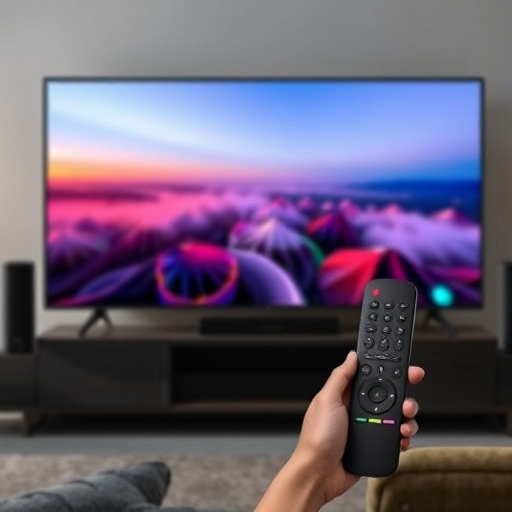
If you’ve found the code you need from the tables in this article, you’re already on the right track. The next step is to manually program your remote, which is a quick and effective method. Here’s how to set up your remote with the code:
- Turn on your Hisense TV.
- On your remote, press the TV button.
- Hold the Setup button on your remote until the red indicator light flashes, then release the Setup button.
- Enter the code that corresponds to your universal remote.
- Point the remote at your TV, press and hold the power button until the TV turns off.
- Once the TV powers off, release the power button.
Here is the table listing the brand-wise universal remote codes for Hisense TV:
| Brand | Universal Remote Codes |
|---|---|
| Ge Universal Remote | 0073, 0182, 0216 |
| Magnavox Remote Codes | 0133, 0069, 0097, 0016 |
| Philips Remote Codes | 0908, 0819, 0223 |
| One for All Remote Codes | 26146, 42224, 43155, 24344, 21262, 25612, 24525, 44631, 35254, 34243 |
| Blackweb Universal Remote Codes | 3537, 1173, 0182, 2463, 2060, 0077, 2464, 0004, 0216, 0073, 1016, 1176, 2503, 4145, 4051, 4127 |
| Inteset Universal Remote Codes | 13519, 14070, 12183, 10556, 14029, 14398, 13382, 10156 |
| Xfinity Remote Hisense TV Codes | XR-15: 12183, 12098, 11756, 11660, 11314, 10748, 13382 XR-11: 12183, 10178, 11756, 12098, 11660, 11314, 10748, 13382, 13118, 12731, 12296 XR-2: 11660, 11314, 10748, 11756, 10178 XR-5: 12183, 10178, 11756, 12098, 11660, 11314, 10748, 13382, 13118, 12731, 12296 RED OK-SELECT: 11314, 10748, 11756, 11993 Gray OK-SELECT: 10748, 11756 |
| Radio Shack Remote Codes | 078, 209, 284, 345 |
| Gmatrix Remote Codes | 1126, 1130, 1141, 1154, 1157, 1169, 1290 |
| Cox Remote Codes | 0748, 1314, 1660, 2098, 2355 |
| Bose Remote Codes | 10748, 10508, 10556, 11314, 11363, 12098 |
| Cybertec Remote Codes | 203, 006, 083, 062, 061, 007, 008, 057, 102, 103, 108, 107, 173, 174, 186, 187, 189, 271, 273, 274, 299 |
| Chunghop Remote Codes | 898, 677, 707, 676, 442, 443, 444, 445, 446, 447, 448, 449, 450, 451, 452, 453, 454, 455 |
| RCA Remote Codes For Hisense TV | 10748 |
Your remote has been successfully programmed and is ready to use. This method works for both battery-operated and USB-charged universal remotes. Be sure to have the code handy beforehand to avoid any frustration during the process.
How To Program Your Remote Without a Code
Not everyone is sure which code works best for their universal remote. To make things easier, Hisense offers an alternative method for programming the remote without using a code. Follow these steps carefully:
- Turn on your TV manually by pressing the power button.
- Take your remote and press the TV power button for 3 seconds. This will put the remote into pairing mode.
- Point the remote towards your TV and press both the Channel Up and Channel Down buttons simultaneously. Continue pressing until your TV turns off on its own.
- Turn on the TV using the remote by pressing the power button.
- If the TV powers on, press the Device Button. This step is crucial because it saves the code after a successful pairing.
Troubleshooting Tips for Remote Not Working
If you’ve been able to enter the correct code without any issues, that’s great! However, if you’re facing difficulties, your remote may have a few problems.
Follow these steps to diagnose and resolve the issue:
- Buttons not held down – Ensure you’re holding down the device or TV key button properly. If you don’t press and hold it as required, the code entry won’t work.
- Low batteries – Remotes often arrive without batteries or with weak ones. The easiest fix is to replace the old batteries with fresh ones.
- Interrupted signal – After entering the code, there may be a slight delay while the remote syncs with the TV. If there’s an obstruction or broken line of sight between the TV and remote, communication will fail. Make sure you’re pointing the remote directly at the TV and give it a moment to respond.
- Faulty parts – The problem could be a defective remote or TV. Test your TV using the manual buttons to ensure it’s working. If the remote doesn’t light up, it’s more likely that the remote is faulty.
- Device interference – Other devices connected via HDMI can interfere with the remote’s signal. Disable ‘HDMI CEC’ in your TV settings to rule out this issue.
- Reboot your TV – Unplug the TV from the power source, wait a few minutes, then plug it back in. Turn on the TV and test the remote again.
- Check compatibility – Make sure the Hisense TV model and the universal remote are compatible. You can verify this on the product page of the universal remote.
Other Ways to Control Your Hisense TV Without the Remote
What if you’ve misplaced your remote, or it’s just not working at all? Don’t worry—there are alternatives that can help you control your Hisense TV even without the original remote.
Using the Hisense TV App
Many Hisense TVs now offer smartphone apps that allow you to control your TV through Wi-Fi. Simply download the Hisense TV app on your smartphone and follow the on-screen instructions to connect. Once connected, you can control your TV just like with a regular remote.
Using a Universal Remote Control
In case the Hisense TV remote codes don’t work or you’ve lost the remote, a universal remote can come to the rescue. The setup for universal remotes is quite similar to the steps we discussed earlier.
Using Voice Assistants
If you have a smart device like Alexa or Google Assistant, you can control your Hisense TV using just your voice. This is a hands-free way to switch channels, adjust the volume, and even turn the TV on and off.
Frequently Asked Questions
What are Hisense TV remote codes and why do I need them?
Hisense TV remote codes are specific numerical sequences used to program a universal remote to control your Hisense TV. These codes enable the remote to sync with your TV, allowing you to change channels, adjust volume, and access other functions. You need them when you want to pair a universal or third-party remote with your Hisense TV.
How do I find the correct Hisense TV remote code for my universal remote?
To find the correct code for your Hisense TV, you can consult the user manual of your universal remote, which typically lists various codes for different TV brands. You can also use online resources or search for Hisense TV remote codes on the manufacturer’s website. Alternatively, some remotes come with an automatic code search feature to help you find the correct code.
What should I do if the Hisense TV remote codes don’t work?
If the remote codes don’t work, make sure you’re entering them correctly. Double-check that the TV is on and that you are following the programming instructions precisely. If the issue persists, try using the automatic code search feature on your universal remote or consult the remote’s troubleshooting guide for further assistance.
Can I use my Hisense TV remote with other devices like soundbars or streaming boxes?
Yes, many Hisense TVs can control additional devices such as soundbars, streaming boxes, and DVD players with the right remote codes. You may need to enter specific codes for each device when programming your universal remote to control them along with your TV.
Where can I find a list of Hisense TV remote codes?
You can find a list of Hisense TV remote codes in the user manual of your universal remote or by searching online. Many websites provide comprehensive lists of remote codes for Hisense TVs. Alternatively, you can also reach out to the customer service team of the remote manufacturer for assistance.
Conclusion
Programming your Hisense TV with a universal remote using the correct remote codes can greatly enhance your viewing experience by allowing you to control all your devices with a single remote. Whether you’re setting up a new remote, troubleshooting, or adding additional devices like soundbars or streaming boxes, knowing the right Hisense TV remote codes is essential.
By following the steps outlined in this guide, you can easily find the correct codes, troubleshoot any issues, and enjoy seamless control of your TV and other connected devices. Remember, if you encounter any problems, there are plenty of resources available, including user manuals, online databases, and customer support, to help you resolve any issues quickly.