

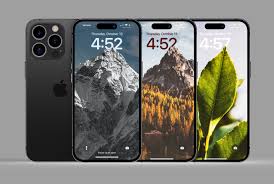
Transform your iPhone lock screen with the best selection of depth effect wallpapers. To achieve that perfect look, all you need is a high-quality wallpaper that enhances the depth effect functionality. That’s why we’ve curated a massive collection of stunning options just for you.
With the release of iOS 16, the iPhone lock screen received a major redesign, and one of the standout features is the depth effect. This AI-driven feature adds an extra layer of dynamic beauty to your lock screen by creating a multi-layered photo effect.
The Depth Effect, also known as the Multilayered Photo Effect, uses AI-powered image processing to split the background into multiple layers. A small portion of the image will even appear to hover above the clock, creating a visually striking look. The feature has been further enhanced with Live Photos support and bolder fonts for even more impact.
While iOS 16 only includes a few built-in wallpapers compatible with this feature, don’t worry — we’ve got you covered! Below, you’ll find over 80 hand-picked iPhone depth effect wallpapers designed specifically to work with this new functionality.
Whether you’re using the latest iPhone 15, iPhone 14, iPhone 13, iPhone 12, or an older model, these high-resolution wallpapers will give your lock screen a fresh, stylish upgrade. After conducting thorough research across various social media platforms, our team has carefully selected these wallpapers, ensuring they’re perfect for the depth-effect feature in iOS 16 and beyond.
What is Depth Effect Wallpaper?
In essence, depth effect wallpaper uses design principles to create the illusion of depth and space on a flat surface, like your phone or computer screen. It’s about making a 2D image appear 3D, or at the very least, give the viewer the sensation that the image extends into a deeper plane. This effect can be achieved through various techniques, such as the use of shadows, gradients, parallax scrolling, and more.
The result? An image that feels more dynamic, engaging, and realistic. Whether it’s a natural landscape or an abstract design, depth effect wallpaper adds layers and complexity to otherwise simple visuals.
Depth Effect Wallpapers for iOS 16 and iOS 17


Why Should You Care About Depth Effect Wallpapers?
At its core, depth effect wallpaper is all about enhancing your digital experience. It’s a way of elevating the ordinary into something extraordinary. Here’s why you should care:
- Immersive Experience: The depth effect creates a feeling of immersion, making your screen feel less flat and more lifelike.
- Dynamic Visual Appeal: As you move your device, or scroll through your wallpaper, the visual depth shifts, keeping your experience fresh and dynamic.
- Personalization: With such wallpapers, you can truly customize your device to reflect your personality, style, and preferences in a modern and creative way.
The Power of Parallax Effect in Depth Wallpapers
One of the most popular techniques used to create depth effect wallpaper is the parallax effect. The parallax effect is a visual phenomenon that occurs when objects closer to the viewer appear to move faster than those farther away.
This technique has been widely used in digital designs to simulate depth and movement. With parallax scrolling, as you scroll, the background layers move at a different speed than the foreground, creating the illusion of depth. It’s like you’re traveling through the scene rather than just observing it.
If you’ve ever played a 2D platformer video game, you’ve seen the parallax effect in action. The background moves slower than the characters, giving the illusion of a world that extends beyond the edges of the screen. Now, imagine bringing that feeling to your wallpaper.
Designing Your Own Depth Effect Wallpaper
Creating your own depth effect wallpaper can be a fun project, especially if you want something unique. Here’s how you can design one yourself using design software:
Start with a Simple Image
Choose an image that has elements you can manipulate to create depth. For example, a landscape with a foreground (like trees or a road) and a background (like mountains or a sky) is perfect for adding layers.
Add Multiple Layers
Split the image into different layers—each layer representing a part of the scene. The closer elements should be on top layers, while distant ones should go on the bottom.
Use Shadows and Gradients
Apply gradients to the layers to simulate lighting and depth. For example, darker tones at the bottom give a sense of distance, while lighter tones at the top can suggest closer objects.
Incorporate Parallax Elements
If you’re feeling more adventurous, try creating a parallax effect by designing an animated wallpaper where each layer moves at a different speed. This can be done with software like After Effects or similar tools.
Types of Depth Effect Wallpapers You Can Explore
There are various styles and themes of depth effect wallpapers that you can explore. Depending on your aesthetic preferences, here are a few ideas to get you started:
Nature Themes:
Nature landscapes, forests, beaches, and mountains make great candidates for depth effects. The layers of trees, rocks, and distant mountains can be manipulated to create a profound sense of depth.
Urban Themes:
For city lovers, an urban skyline at night with lights and shadows can look stunning with a depth effect. You can experiment with skyscrapers, streets, and neon signs to create a bustling, three-dimensional world.
Abstract Designs:
If you’re into modern, artistic designs, abstract depth effect wallpapers can be mind-bending. Shapes, colors, and gradients that mimic three-dimensional movement add a fresh vibe to your screen.
The Future of Depth Effect Wallpapers
As technology evolves, so do the techniques used to create depth effect wallpapers. With the rise of 3D displays, augmented reality (AR), and virtual reality (VR), we can expect to see even more immersive and interactive depth effects. Future wallpapers might even react to your touch or movements, further enhancing the sense of space and depth.
Frequently Asked Questions
What is Depth Effect Wallpaper?
Depth Effect Wallpaper creates an immersive 3D visual experience on your screen by simulating layers and movement. It adds depth and realism, making your wallpaper appear more dynamic and engaging.
How do I set a Depth Effect Wallpaper on my phone or device?
To set a Depth Effect Wallpaper, you typically need to select an image or video that supports this feature. Go to your device’s settings or wallpaper menu, choose the Depth Effect option, and follow the on-screen instructions to set it as your background.
Does Depth Effect Wallpaper drain battery life?
While Depth Effect Wallpapers are visually stunning, they may use more battery compared to static wallpapers, especially if they involve moving elements. The impact on battery life depends on the complexity of the wallpaper and the device’s specifications.
Can I customize the Depth Effect Wallpaper to suit my style?
Yes, many devices and apps allow you to personalize Depth Effect Wallpapers. You can adjust the intensity, choose different animations, and even create your own wallpapers to match your preferences.
Are Depth Effect Wallpapers compatible with all devices?
Depth Effect Wallpapers are available on most modern smartphones and tablets, especially those running the latest operating systems. However, some older models or devices may not support this feature, so it’s best to check your device’s compatibility before using it.
conclusion
Depth Effect Wallpaper is a game-changer in the world of mobile and desktop customization, offering a dynamic, 3D visual experience that breathes life into your screen. With its ability to add layers of movement and depth, it transforms your device from a simple tool into a personalized visual masterpiece. Whether you’re looking to add a touch of elegance or create a more interactive user experience, Depth Effect Wallpaper offers endless possibilities for customization. Embrace the magic of depth and elevate your screen’s aesthetic to new heights, turning your device into a truly immersive experience.