

Universal remote controls offer clear advantages over traditional TV remotes for several reasons. If you lose or damage your remote, you can quickly replace it with a universal one and easily program it to work with your TV or other devices. With just one universal remote, you can control multiple devices.
Among the many options available, RCA universal remote controls stand out as a popular choice. In this guide, we’ll explore RCA universal remote codes and show you how to program your RCA remote to work with a variety of devices.
RCA universal remotes are designed to manage a wide range of devices, including TVs, DVD players, VCRs, cable boxes, satellite receivers, and more. The American electronics brand offers several models, with some even capable of controlling up to eight devices at once.
The Journey of Setting Up an RCA Universal Remote
Let me take you back to a time when I first encountered the RCA Universal Remote. I was excited—finally, one remote to rule them all! But, when it came to the setup, I was like a deer caught in headlights. There were codes everywhere: on tiny pieces of paper, hidden inside user manuals, and scattered across the internet. I had no idea what was what. After hours of frustration and trial and error, I finally found the key to it all: RCA Universal Remote codes.
But here’s the catch: these codes are essential for syncing your RCA Universal Remote with all your devices, including TVs, DVD players, sound systems, and more. Without them, you’re just holding a fancy paperweight. Don’t worry though—I’m here to guide you step by step on how to set up and use your RCA Universal Remote efficiently.
What Are RCA Universal Remote Codes?
Before diving into the setup, it’s important to understand what RCA Universal Remote codes actually are. These codes are unique numbers assigned to various electronic devices. They tell the remote how to communicate with the device you’re trying to control. So, whether you want to control your RCA TV or your Sony Blu-ray player, you need the correct code for that particular device.
For example, your RCA Universal Remote might use different codes for different brands of TVs. So, if you’re trying to control your Samsung TV, the code will be different from the code used for an LG TV. Each brand and type of device has its own set of codes, which is where things can get a little tricky. But don’t stress! Once you have the right codes, you’ll be good to go.
RCA Universal Remote Codes for TVs
- Admiral: 0463, 4030, 4111, 4221, 10093, 10463
- Advent: 1570, 10761
- Affinity: 3717, 3577, 3870
- Aiwa: 1362
- Akai: 1675, 11675, 10702, 10672
- AOC: 1589, 3720, 1365, 2014, 2087, 4101, 11365, 11589, 12014, 12087
- Apex Digital: 2397, 4347, 4350, 10156, 10748, 10767, 12397
- Ario: 2397
- Astar: 11738
- Asus: 3340
- Atvio: 3638, 3636, 3657
- Audiovox: 1564, 1769, 0623, 10451, 10802, 10846, 10875, 11937, 11951, 11952
- Auria: 2087, 2014, 2277
- Aventura: 0171, 10171
- Avol: 3118
- Axion: 11937
- BGH: 4029, 4070, 0898, 2414, 0876, 4028, 4030
- Blue Sky: 3997
- Britania: 2414
- Broksonic: 0463, 1892, 10463
- Carver: 10054
- CCE: 3782, 4091, 0623, 4092
- Celebrity: 10000
- Champion: 1362
- Changhong: 3814
- Coby: 3478, 3627, 2344, 12306, 12315, 12340, 12343, 12344, 12345, 12347, 12348, 12350
- Commercial Solutions: 1447, 11447, 10047
- Contex: 4053
- Continental: 2357
- Coradir: 2844
- Craig: 3423
- Crosley: 10000, 10054
- Crown Mustang: 0898
- Curtis: 2855, 3577, 3895, 2352, 2397, 4035, 4053, 3636, 1326, 3382, 3717, 12352
- Curtis Mathes: 0623, 10047, 10054, 10451, 10093, 10702, 10145, 11661, 11147, 11347
- Cytron: 1326
- Daewoo: 0623, 10451, 11661, 10661, 10672
- Dell: 11264, 11080, 11863
- Denon: 10145
- Digitrex: 4207
- Dish Network: 11948
- Disney: 1892, 0171, 11892, 81017
- Dumont: 0017, 10017
- Durabrand: 0463, 0171, 1570, 0178, 10463, 10178, 10171, 11034
- Dynex: 2049, 2184, 11463, 11785, 11810, 12049, 12184
- Electroband: 10000
- Electrograph: 11755
- Electrohome: 0463, 1570, 1670, 10463
- Electron: 2855
- Elektra: 0017, 0623
- Element: 3559, 1687, 2183, 2964, 1886, 11886, 12183, 01815, 70017, 81918, 45112, 72015, 34211, 79517, 24912, 34611
- Elite: 1457
- Emerson: 1864, 1394, 0171, 1886, 0463, 1963, 0178, 0623, 3623, 2183, 3559, 11864, 10017, 10451, 10463, 10178, 10171, 11661, 11394, 11944, 11963
- Emprex: 11422
- Encross: 0876
- Envision: 1589, 1365, 2087, 2014, 10813, 11365, 11589, 12014, 12087
- Epworth: 1362
- EQD: 2014, 2087, 2277
- ESA: 0171, 1963, 10171, 11944, 11963
- Fair Mate: 1326
- Favi: 3382
- Fisher: 1362
- Fluid: 2964, 3559, 12964, 70013
- Fujitsu: 10809
- Funai: 1864, 0171, 1394, 1963, 10000, 10171, 11271, 11963
- Gateway: 11755, 11756
- GE: 1447, 0178, 11447, 10047, 10451, 10178, 11347
- GFM: 0171, 1963, 1886, 1864, 10171, 11886, 11963, 12167
- Gibraltar: 0017, 10017
- Go Video: 10886
- GoldStar: 0178, 10178
- Haier: 1749, 2309, 1748, 3382, 2293, 4398, 1570, 11034, 11748, 11749, 12309
- Hallmark: 0178, 10178
- Hannspree: 1348, 11348, 11745
- Harman/Kardon: 10054
- Havermy: 10093
- H-Buster: 3620, 3419
- Helios: 10865
- Hello Kitty: 10451
- Hewlett Packard: 11494, 11502
- Hisense: 13519, 14740, 14618, 12183, 15156, 15176, 15185, 14656, 11660, 11314, 11756, 13382, 14487, 35611, 44211, 67614, 78115
- Hisense Roku: 44211, 55712
- Hitachi: 1643, 3639, 3382, 3697, 11643, 11145, 10679, 10145
- Hiteker: 3118
- HP: 11494, 11502
- Hyundai: 4509
- iLo: 0171, 1394, 11394, 11684, 11990
- Infinity: 10054
- Initial: 11990
- Insignia: 12049, 14487, 11780, 13227, 11564, 11326, 12184, 15213, 11892, 12002, 11423, 10171, 10463, 11385, 11660, 12751, 11756, 28911
- Insignia Roku: 12219, 44211
- Inteq: 0017, 10017
- IRT: 0623
- iSymphony: 3382, 3118, 3094
- JBL: 10054
- JCB: 10000
- JC Penney: 0178, 0156
- JCM: 2256, 12256
- Jensen: 1326, 10761
- JVC: 11447, 11347, 10767, 10256
- Kawasaki: 3179
- Kawasaki TV: 11892
- Kenwood: 2383, 10761, 10767, 10161, 10801
- Keurig: 11502
- Kodak: 12964, 2359, 12965, 3799, 10672
- Konka: 10666
- Koss: 1376, 10256
- KTC: 3782, 30011
- Kuro: 45116
- LG: 11264, 11612, 11463, 11502, 10748, 10767, 11364, 10252
- Lifetree: 3068
- Magnavox: 10272, 11761, 11161, 10767, 11760, 10746, 10676, 10746, 11447
- Mando: 11990, 01815
- Mitsubishi: 10676, 12237
- Motorola: 10761
- Nakamichi: 11990, 10256
- NEC: 11767
- Nokia: 11670
- Onn: 18227, 18256, 10763
- Optimus: 10742, 10762
- Orion: 11660, 10451
- Panasonic: 11756, 10451, 11936, 11364
- Philips: 10801, 11364, 11756, 11147
- Pioneer: 10272, 11167
- Proscan: 10672, 10451, 10472
- RCA: 11756, 10451, 11385, 11502, 11760
- Samsung: 11643, 11745, 11502
- Sanyo: 10161
- Seiko: 11764, 10801
- Sharp: 10673, 11367, 10801, 10662, 11167
- Sony: 11165, 10252, 11347
- Sylvania: 11367, 11751, 10472, 11272
- Symphonic: 10662
- TCL: 11892, 11745, 11756
- Teac: 10673
- Vizio: 12484, 11067
- Wells Gardner: 0423
| TV Brand | Code Type | Codes |
|---|---|---|
| LG TV | 4-Digit Code | 2731, 2358, 3397, 0178, 0017, 1423, 1447, 2424, 1178, 1265, 0856, 1934 |
| 5-Digit Code | 11423, 10017, 10178, 10856, 11447, 12358, 12424, 12731, 11265, 11136, 11565, 21442, 25641, 31462, 31311, 52412, 63913, 38312, 47312, 58813, 11840, 11860, 14397, 14398, 11756 | |
| Samsung TV | 4-Digit Code | 2051, 3993, 0178, 0702, 0650, 0030, 0766, 0814 |
| 5-Digit Code | 10702, 10178, 11060, 12051, 11251, 11565, 14241, 14425, 14545, 24366, 21818, 97817, 77114, 79113, 16616, 36218, 66611, 43311, 94818, 38811, 11632, 15386, 15371 | |
| Hisense TV | 4-Digit Code | 3519, 2183, 4398, 3382, 4029, 1314, 1660, 2098, 2355 |
| 5-Digit Code | 13519, 14740, 14618, 12183, 15156, 15176, 15185, 14656, 11660, 11314, 11756, 13382, 14487, 35611, 44211, 67614, 78115, 59413, 10748, 12098, 12355, 12419, 14355, 24525, 25146 | |
| 39812, 61514, 31612, 42113, 39011 | ||
| Hisense Roku TV | 35611, 44211, 55712, 67614, 78115, 59413, 61514, 72015 | |
| Insignia TV | 4-Digit Code | 2049, 1564, 1326, 1892, 0171, 0463, 1963, 2184, 1423, 0171, 1517, 1660, 1785, 2417, 2751 |
| 5-Digit Code | 12049, 14487, 11780, 13227, 11564, 11326, 12184, 15213, 11892, 12002, 11423, 10171, 10463, 11385, 11660, 12751, 11756, 28911, 12219, 49412, 28511, 06919, 07216, 69212, 89713 | |
| 70017, 39512, 45013, 69613, 82615, 61312, 11204, 11517, 11810, 11963, 12049, 12417, 11554, 13162, 21442, 22116, 22235, 22641, 23244, 23543, 24142, 24245, 24364, 25151, 26216 | ||
| 33646, 68515, 22011, 57513, 47913, 36412, 40211, 64713, 56111, 79016, 21711, 74115, 41011, 73114 | ||
| Sony TV | 4-Digit Code | 0810, 1300, 1317, 1685 |
| 5-Digit Code | 31912, 89616, 41112, 10000, 10810, 12778, 14448, 14189, 11300, 14541, 21115, 22556, 26411, 44613, 33211, 44411, 44211 | |
| TCL TV | 4-Digit Code | 2434, 4398, 3183, 2429, 3426, 3847, 2414, 0898, 4178, 6918 |
| 5-Digit Code | 14398, 12434, 13183, 11756, 80313, 36711, 57513, 15919, 68014, 37511, 61513, 44411, 44211, 80312, 26245, 78913, 84416, 33012, 95017, 57011, 36711, 61514 | |
| TCL Roku TV | 44211, 61514 | |
| Vizio TV | 4-Digit Code | 1758, 3758, 2707, 2757, 0864, 1756, 0885 |
| 5-Digit Code | 11758, 13758, 14905, 14723, 12707, 12757, 35011, 40412, 80016, 20111, 12512, 11756, 10864, 10885, 15111, 15144, 23155, 23161, 26455, 31544, 36333, 13415, 22111, 28911 | |
| 51914, 34112, 14905, 14723 |
RCA Universal Remote Codes for VCR
- American High: 0035
- Canon: 0035
- Carver: 0081
- Crosley: 0081
- Curtis Mathes: 0035, 0060, 0162
- Daewoo: 0045
- Emerex: 0032
- Fuji: 0035
- GE: 0060, 0035, 0202
- Harman/Kardon: 0081
- Instant Replay: 0035
- JC Penney: 0035
- Kodak: 0035
- Magnavox: 0035, 0081
- Marantz: 0081, 0035
- Matsushita: 0035, 0162
- MEI: 0035
- Memorex: 0035, 0162
- Motorola: 0035
- NAP: 0035
- Olympus: 0035
- Optimus: 0162
- Panasonic: 0035, 0162
- Penney: 0035
- Philco: 0035
- Philips: 0081, 0035
- Polk Audio: 0081
- Proscan: 0060, 0202
- Quasar: 0035, 0162
- RCA: 0060, 0202, 0035
- RCN: 0060
- Realistic: 0035
- Samsung: 0045
- Scott: 0045
- Sears: 0035
- Semp Toshiba: 0045
- Signature: 0035
- Signature 2000: 0035
- Sony: 0032, 0035
- Sylvania: 0035, 0081
- Technics: 0035, 0162, 0060, 0202
- Teknika: 0035
- Toshiba: 0045
- Vector: 0045
- Video Concepts: 0045
- Wards: 0035, 0045, 0060, 0081
- XR-1000: 0035
RCA Universal Remote Codes for Satellite:
- Arion: 1279, 4348
- Arris: 0869
- AZ America: 3599
- Bell: 0775
- Bell ExpressVu: 0775
- Bell Satellite TV: 0775
- Century: 0856
- Claro: 4546, 3790
- Coship: 4546, 3790
- DirecTV: 1377, 1442
- Dish Mexico: 0775
- Dish Network: 0775
- Dishpro: 0775
- Echostar: 0775, 2262, 2527
- Embratel: 4546
- Frontier Communications: 0775
- General Instrument: 0869
- GOI: 0775
- Gradiente: 0887, 0856
- GVT: 3789
- HTS: 0775
- Huawei: 4546
- Hughes Network Systems: 1442, 1377
- Humax: 1377
- Intv: 4348
- Jerrold: 0869
- JVC: 0775
- LG: 1377
- Motorola: 0869, 0856, 3469
- Movistar: 2527, 2262
- Nagra: 2262
- Netgem: 3637
- Netsat: 0887
- Next Level: 0869
- Oi TV: 4460
- Pace: 0887, 3469, 1377, 2895, 3111, 3790, 4546
- Philips: 1442, 2619, 0856, 0887, 3469
- RadioShack: 0869
- RCA: 1442
- Sagem: 1692
- Sagemcom: 3789
- Samsung: 1442, 1377
- Shaw Direct: 0869, 0775
- Sky Brasil: 1377, 0887, 0856, 2619, 3111
- Sky Mexico: 3469, 2619, 0856, 0887, 1377
- Star: 0887
- Star Choice: 0869
- Supernova: 0887
- TDS Telecom: 0775
- Technicolor: 3790, 3469
- Tele Red: 1279
- Telefonica: 1692, 2262, 2527
- Televisa: 0887
- TELUS: 0775
- Thomson: 3469, 1377, 2619
- TiVo: 1377, 1442
- TVA Digital: 2895, 1692, 2262
- UNE: 1692
- Via Embratel: 4546
- Vivo: 2262, 2895, 1692, 2527
- Windstream: 0775
- Zenith: 0856, 3469
RCA Universal Remote Codes for Cable:
- Access Communications: 1376, 2187
- Adams Cable TV: 1376, 4079
- ADB: 2254, 1481, 1998, 2302, 3028
- Allegiance Communications: 1376
- Amino: 1615, 1481, 2482, 1998, 2302, 3028
- Arion: 3336
- Armstrong: 1376, 3560
- Arris: 1376, 1998, 2187, 1982
- Arvig Communication Systems: 1376, 1982, 1998, 3028
- AT&T: 0858, 1877, 2187
- AT&T U-verse: 0858, 1877, 2187
- Atlantic Broadband: 1877, 3560, 1376, 4079
- ATMC: 1376, 1982, 3028, 1998
- Bell: 1998, 1877
- Bell Aliant: 1998
- Bell Fibe TV: 1998
- Blue Ridge Communications: 1877, 3560
- Bright House: 1877, 1376, 3294
- Broadstripe: 1376
- Buckeye Cable System: 1376, 2187, 1877
- Cable America: 1376, 1877
- Cable Axion Digitel: 1376
- Cable One: 1376, 3560, 1877
- Cablecom Mexico: 1376
- Cablem·s: 3119, 1376, 1877
- Cablevision: 1376, 1877, 3336, 4375
- Cablevision du Nord: 1376
- Cablevision Victoria: 1376, 4375
- Cass Cable: 1376
- CCAP: 1877
- CenturyLink: 1998
How to Program RCA Universal Remote
Regardless of the RCA Universal Remote model you have, the programming steps for pairing it with your TV remain consistent. This holds true no matter what TV brand you intend to use the RCA Universal Remote with.
Pairing Method with Remote Codes
Before proceeding with the setup, make sure to have the correct codes for your specific TV brand. We’ve compiled a list of all the relevant codes below, or you can refer to the manual that came with your remote for guidance.
How to Program Your RCA Universal Remote: Step-by-Step Guide
Step 1: Insert Batteries and Power On Your Device
Place fresh batteries into your RCA remote and turn on your TV or the device you want to control.
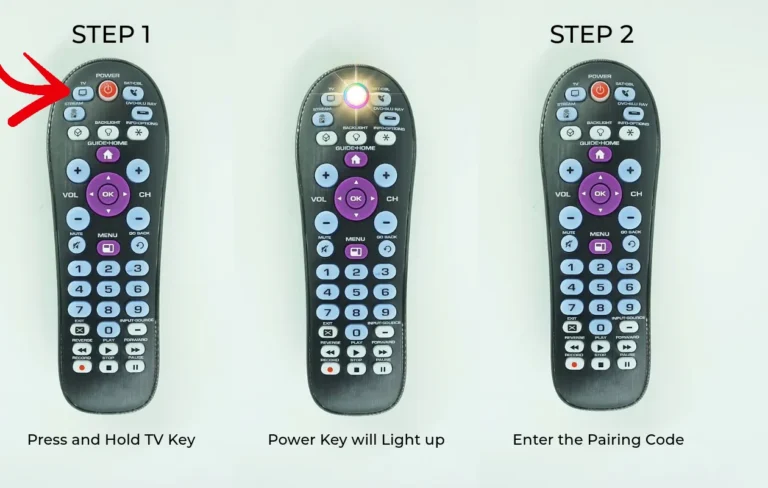
Step 2: Press and Hold the Device Key
Point the remote towards your TV (or another device like Cable, DVD player, etc.) and press and hold the corresponding device key on the remote.
Step 3: Release the Device Key
Once the Power key on the remote lights up, release the device key.
Step 4: Enter the Pairing Code
While the Power button is lit, input the pairing code for your device from the provided list.
Step 5: Check for Confirmation
When you enter the correct code, the Power button light will turn off. Test the remote’s functionality to ensure it controls your device.
Tip: If the Power button blinks twice, it means the code is incorrect. Try entering the next code or test other available codes until the Power button turns off.
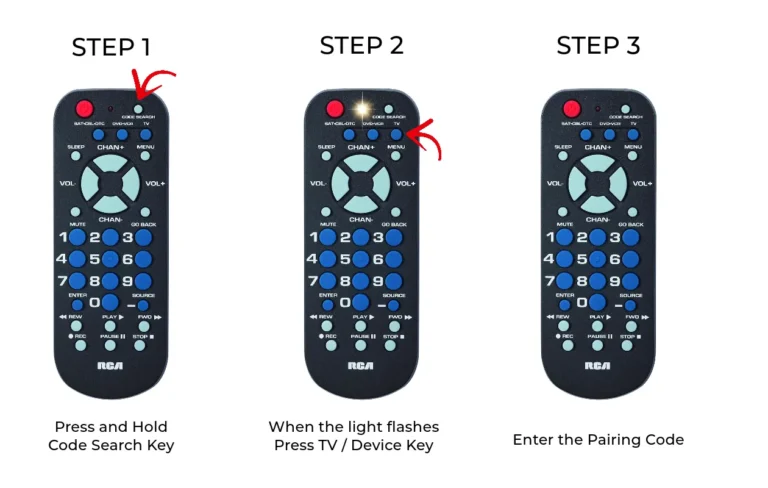
Pair RCA Remote with Code Search Key
Step 1: Power On Your Device
Ensure your device is powered on and the remote is aimed towards it. Press and hold the Code Search key on your remote until the indicator light turns on.
Step 2: Select the Device
Press and release the device key (e.g., TV key for programming a TV).
Step 3: Enter the Code
Manually enter the code for your device. You can find the code list above or refer to the manual included with your remote.
Step 4: Confirm the Code
Once the correct code is entered, the indicator light will turn off. Test the remote to ensure it works with your device.
Note: If the indicator light flashes twice after entering the code, it means the code is incorrect. Try entering the next code on the list until the remote works properly.
Program RCA Remote with Auto Codes
Step 1: Power On Your Device
Turn on your TV or the device you want to program with the RCA remote. Ensure the remote is pointed towards the device.
Step 2: Activate Code Search
Press and hold the Code Search key until the LED indicator turns on.
Step 3: Select Your Device
Press and release the appropriate Device key (e.g., TV key for programming your TV). The indicator light will blink once and remain on.
Step 4: Start Searching for the Code
Press and release the Power key repeatedly until your device turns off. You may need to press the key up to 200 times.
Step 5: Save the Code
Once your device turns off, immediately press the Enter key within 4 seconds to save the code. The LED indicator will turn off, confirming the process is complete.
RCA Universal Remotes Models
Available RCA Universal Remote Models
RCA offers a range of universal remote models to suit various needs. Here’s a list of currently available RCA Universal Remote Controls:
2-Device and 3-Device RCA Remote Controllers:
- RCR313BE
- RCR3273E
- RCR503BE
- RCRH02BE
- RCRN03BE
4-Device and 5-Device RCA Remote Controllers:
- RCR414BHE
- RCR504BE
- RCRBB04GBE
- RCRBB05BHE
- RCRBB05BHZ
- RCRN04GBE
- RCRPST04BE
- RCRPST05SE
- RCRTBL04BE
6-Device and 8-Device RCA Remote Controllers:
- RCR6473E
- RCRN06GBE
- RCRPST06GBE
- RCRTBL06BE
This guide covers the steps to pair and program your RCA universal remote with any TV brand you own. With these remote codes, you can easily control multiple devices with a single remote. So, the next time you misplace your TV remote, rest assured that an RCA remote is ready to help!
Frequently Asked Questions
What are RCA Universal Remote Codes?
RCA Universal Remote Codes are specific numbers assigned to various devices (such as TVs, DVDs, cable boxes, etc.) that allow an RCA universal remote to communicate with and control them. By entering the correct code for your device, you can set up the remote to control multiple devices, simplifying your home entertainment system.
How do I find the correct RCA Universal Remote Code for my device?
To find the correct code for your device, you can either refer to the RCA Universal Remote’s code list included in the manual or use the code search method. The manual lists codes for popular brands and device types, while the search method involves the remote trying different codes until it successfully connects with the device.
What do I do if the RCA Universal Remote Code does not work?
If the code does not work, you can try entering other codes listed for your device brand, as some brands may have multiple codes. Alternatively, you can use the code search method by pressing the “Code Search” button on the remote and following the instructions to find a working code for your device.
Can I program my RCA Universal Remote without the code list?
Yes, you can program the RCA Universal Remote without the code list by using the code search method. This method allows the remote to automatically scan through all the available codes for your device, eventually finding one that works.
How do I reset my RCA Universal Remote to default settings?
To reset your RCA Universal Remote to its default settings, press and hold the “Code Search” button until the red indicator stays on. Then, release the button and press and hold the “Power” button until the red indicator turns off. This will restore the remote to its factory settings, and you can reprogram it with new codes.
conclusion
Setting up your RCA Universal Remote is a simple and effective way to streamline the control of all your devices with just one remote. By using the correct RCA Universal Remote codes, you can effortlessly program your remote to control a variety of electronics, from TVs and cable boxes to DVD players and sound systems. Whether you choose to manually enter the codes or utilize the remote’s code search function, the process is straightforward and ensures convenience for your entertainment setup.
Remember, if you ever encounter any issues with finding the right code or programming your remote, don’t hesitate to consult the user manual or try resetting the remote to its default settings. With the right guidance and the correct codes, you can maximize the potential of your RCA Universal Remote and enjoy seamless control over all your devices.