

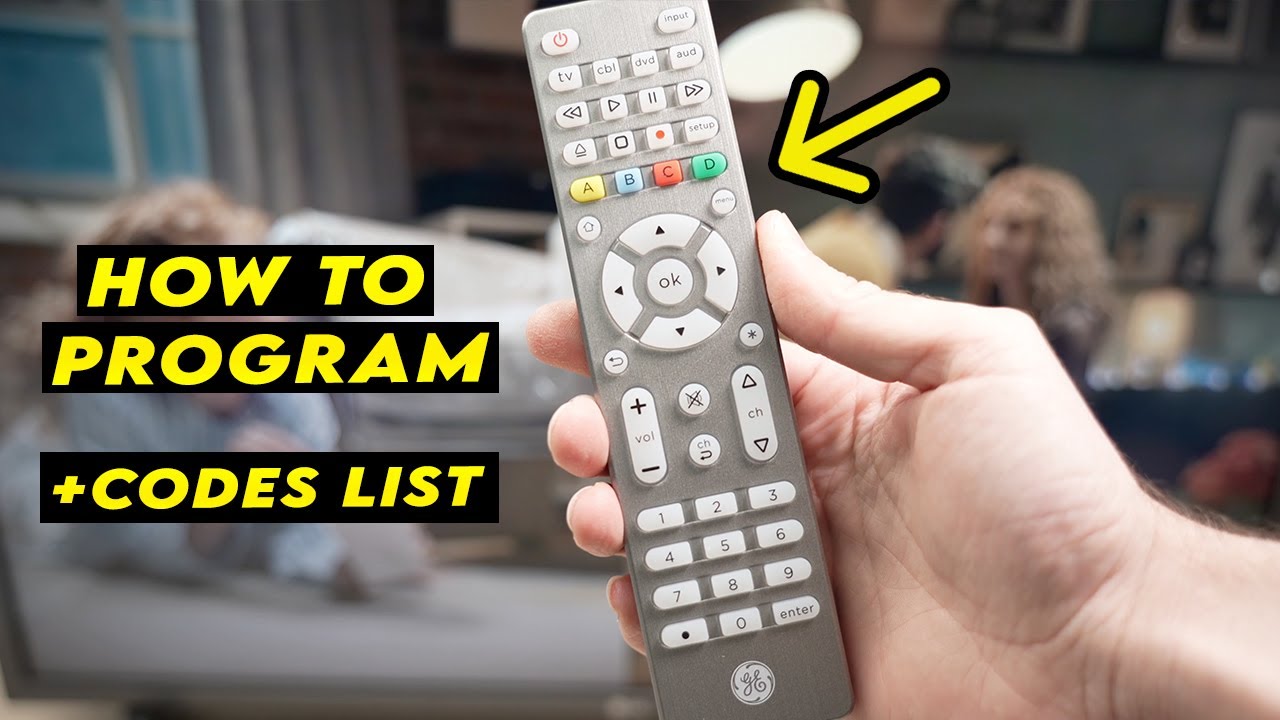
One of the most overlooked yet brilliant inventions has to be the universal remote. When the original remote goes missing or finding an exact replacement becomes impossible, universal remotes from various brands step in to save the day. What’s great about these remotes is how simple it is to program and configure them to work with almost any TV, cable box, or other electronic devices you own.
In this guide, we’ll walk you through the process of programming a General Electric (GE) universal remote and provide the remote codes needed to link it with your specific device. Keep reading to learn everything you need to know for setting up your GE universal remote.
Two Ways to Program Your GE Universal Remote Codes
You can program your GE Universal Remote to control various electronic devices, such as a TV, set-top box, DVD, or Blu-ray player. Below, you’ll find two methods to program your remote effectively.
How to Program GE Universal Remote with a Code
Follow these steps to program your GE Universal Remote using a device-specific code:
- Turn on your TV.
- Press and hold the Setup button on your remote until the red power button light turns on.
- Press the TV button on the remote.
- Enter the programming code for your TV (find this code in the provided list).
- When the correct code is entered, the red light on the power button will turn off.
- Test the remote functions to ensure the buttons work properly. If they don’t, try another code from the list as many TV brands have multiple codes.
How to Program GE Universal Remote without a Code
If you don’t have the device code, use this method to program your GE Universal Remote:
- Power on your TV.
- Press and hold the Setup button on the remote until the red light on the power button turns on.
- Press the TV button on the remote.
- Press and release the power button every 5 seconds until the TV turns off.
- Turn the TV back on using the power button on the TV itself.
- Press and release the channel up button on the remote every 3 seconds until the TV turns off again.
- Press the TV button on the remote to save the programming.
- Test the remote functions like power, volume, and channel changes to ensure everything is working smoothly.
GE Universal Remote Codes – Complete List (for TVs)
- ABEX: 0401
- ADA: 0461
- ADC: 1431, 1661
- Admiral: 0371, 0681, 1441, 1661, 4991
- Advent: 3261, 0631, 0871, 2891, 4931, 0581
- Adventura: 0151
- Affinity: 2361, 2381
- Aiko: 1011, 4321
- Aiwa: 0411, 0931, 4731, 4801
- Akai: 0191, 5891, 5901, 5911, 5921, 6041, 3215, 0331, 4151, 4461, 5141, 5171
- Alleron: 1711
- Amark: 1441
- Ames: 1275
- Amtron: 2191
- AMW: 0645, 0825
- Anaba: 1375
- Anam.National: 0271, 1941, 2151, 3451, 2191, 2331, 3431
- Aoc: 4261, 1961
- Apex: 6081, 6101, 0045, 4841, 2521, 0191, 1891, 0425, 0431, 0671, 1025, 1105, 5111, 0245
- Archer: 1441
- Aria: 4101
- Ario: 1891
- Aspect: 1271
- Atvio: 2371
- Audiovox: 2191, 2451, 4031, 4051, 4521
- Auria: 1221, 1171, 1411
- Aurora: 3061
- Aventura: 0141
- Axion: 0881
- Bang & Olufsen: 1591
- Belcor: 0001
- Bell & Howell: 1261, 1661, 1691, 3421
- BENQ: 1741, 1761, 2221, 3871
- Bluesky: 3511, 3921
- Bradford: 2191
- Broksonic: 0371, 0211, 0851, 1631, 4951
- Brokwood: 0001
- Candle: 0001, 0151, 0961, 1221
- Capehart: 0391, 4221
- CCE: 3721
- Celebrity: 1901
- Celera: 0191
- Centrios: 1361
- Centurion: 1221
- Cetomer: 0001, 1631, 2901, 2961
- Cetronic: 1941
- Changhong: 4841
- Chimei: 3071
- Cineral: 3511, 4321
- Citizen: 0001, 0961, 1221, 1661, 1941, 2191, 4321
- Clairtone: 0011
- Classic: 1941, 4841
- CLP: 0061
- CLP Classic: 0001, 0041, 0161
- Coby: 2521, 3351, 2511, 2531, 5091, 5191, 2541, 2551
- Color Voice: 1431
- Colortyme: 0001, 1221, 1431
- Concerto: 0001, 1221
- Concierge: 1771, 1781
- Contec: 0011, 1911, 1941, 2191
- Contex: 5411
- Cornea: 1471
- Craig: 1941, 2191
- Crown: 1941, 2191
- CTX: 1441
- Curtis: 2121, 2141, 2361, 2371, 5411, 1881, 1891
- Curtis Mathes: 0351, 1551, 5351, 5371, 0001, 0261, 1221, 1661, 4011, 4941
- CXC: 1941, 2191
- Cybervision: 3511
- Daewoo: 1561, 0001, 0591, 0721, 0831, 0971, 1221, 1231, 1251, 1431, 1501, 1521, 1551, 1941, 2181, 4321, 4681
- Daytron: 0001, 1221
- DELL: 0981, 1401, 3441, 2041, 3601, 3811
- Devant: 6211
- Digimate: 4301
- Digistar: 0381, 0581, 0871, 1061, 2451, 2471, 3901
- Dimensia: 1691, 3421
- Dish Network: 5491
- Disney: 0371, 1101
- Distar: 3231
- Dukane: 1271, 1981
- Dumont: 0001, 1771, 1781
- Durabrand: 0371, 0141, 0861, 0921, 1381, 2271, 2291, 5121
- Dynasty: 1941
- Dynex: 3141, 5311, 3161, 0371, 2891
- Electroband: 0011, 1901
- Electrohome: 0001, 1221, 1921, 2151, 3431
- Electron: 2121
- Elektra: 1661
- Element: 5421, 2401, 5471, 1091, 1651, 5831, 5841, 5341, 6021, 5361
- Elite Video: 0901
- Emerson: 2761, 5761, 5221, 5231, 5561, 5831, 4731, 5421, 5741, 0001, 0141, 1651, 0201, 0231, 0951, 1551, 5551
- Envision: 1411, 5401, 0001, 0071, 1221, 3751, 4261
- EQD: 1171, 1411
- ESA: 0141, 1381
- FAVI: 2141
- Fisher: 5001, 1261, 1531, 1581, 1911, 3481
- Fluid: 2401, 2421, 2431
- Fujistsu: 0901, 1711, 4241, 4341
- Funai: 0445, 0141, 0931, 1711, 1941, 2191, 4731, 4761
- Futuretec: 1941, 2191
- Gateway: 0501
- General Electric (GE): 4921, 0141, 0191, 1001, 0001, 0041, 0051, 0261, 3451, 0361, 0791, 1221, 1921, 1951, 2151, 3431, 4011
- GFM: 0141, 5831
- Gibralter: 0001, 1771, 1781
- Goldstar: 0001, 0611, 0761, 0931, 1181, 1221, 1501, 1911, 4731
- GPX: 4701
- Gradiente: 3511
- Grundig: 0291, 1241, 1551, 5421
- Grunpy: 1941, 2191
- Haitai: 0871
- Hallmark: 1941
- Hannspree: 0001, 5731, 1941
- Harley Davidson: 0501, 0911
- Harman/Kardon: 1781
- Hewlett Packard: 4091
- Himitsu: 1941
- Hisense: 1511, 1141, 5851
- Hitachi: 0941, 0061, 0081, 0001, 0581, 1411, 1751, 1831, 1911, 2111, 4211
- HP: 4091
GE Universal Remotes come in various models, and you can identify your specific model by removing the batteries and inspecting the sticker inside the battery compartment. Look for labels like CL3, CL4, CL5, or CL6. Once you identify your model, it will streamline your search, allowing you to find the right code more quickly.
| TV Brand | Remote Model | Codes |
|---|---|---|
| Hisense TV | CL3 | 2081, 5331, 2211, 4671, 0671, 3671, 4381, 4391 |
| CL4 | 6161, 1651, 6171, 2081, 5331, 2211, 2141, 5341, 0001, 0671, 4391 | |
| CL5/CL6 | 6161, 1651, 6251, 6171, 2081, 5331, 2211, 2141, 5341, 0001, 0671, 4391 | |
| Hisense Roku TV | CL5 | 6251 |
| CL6 | 6171, 6251 | |
| Insignia TV | CL3 | 2891, 0371, 2271, 0581, 0701, 0871, 0921, 1241, 1381, 2241, 2921, 3761, 3841, 4371, 4721, 4761, 5051, 5061, 5181 |
| CL4 | 0921, 2891, 6171, 0371, 2271, 0141, 0581, 0871, 2241, 6181, 2921, 3761, 4371, 4721, 4761, 5051, 5061, 5181 | |
| CL5/CL6 | 2891, 0371, 6381, 6171, 2271, 0141, 6481, 0581, 0871, 0921, 2241, 6181, 2921, 3761, 4371, 4721, 4761, 5051, 5061, 5181 | |
| Insignia Roku TV | CL5 | 6171, 6381 |
| CL6 | 6381, 6171 | |
| Insignia Fire TV | 6091 | |
| LG TV | CL3 | 0001, 5511, 3001, 5501, 3021, 3091, 3221, 3281, 3311, 5271, 0131, 0251, 0611, 0761, 0931, 1181, 1221, 1471, 1501, 1911, 3811, 4731 |
| CL4/CL5 | 6021, 0001, 5511, 3001, 1911, 1181, 1221 | |
| CL6 | 6021, 5511, 0001, 3001, 1911, 1181, 1221 | |
| Roku TV | CL4/CL5 | 6171, 6001 |
| CL6 | 6171, 6251, 6001, 6381 | |
| Samsung TV | CL3 | 3301, 5471, 5521, 2741, 2961, 3321, 0001, 0101, 0251, 0261, 0331, 0351, 0531, 0571, 0711, 0781, 1191, 1221, 1311, 1501, 1911, 2071, 2141, 2721, 3471, 3561, 4011, 4941, 4961 |
| CL4/CL5/CL6 | 5791, 5801, 3301 | |
| Sony TV | CL3 | 5321, 4981, 1071, 1641, 1731, 1901, 2161, 2741, 3531, 3891, 4101 |
| CL4/CL5/CL6 | 1071, 5811, 5321, 4981, 1901, 2741 | |
| TCL TV | CL3 | 2851, 0091, 1421, 1691, 1851, 2011, 2061, 2111, 2301, 3421, 3431, 3571, 4921 |
| CL4/CL5 | 6171, 5961, 6031, 5771, 6201 | |
| CL6 | 6171, 5961, 6031, 6651, 6201, 5771 | |
| TCL Roku TV | 6171 | |
| Vizio TV | CL3 | 5631, 5561, 5611, 1471, 1741, 2021, 2901, 3651, 3741, 3851, 4081, 5571, 5581, 5591, 5601, 5621, 5641, 5651, 5661, 5671, 5681, 5691, 5701, 5711 |
| CL4 | 5611, 5631, 5561, 6121, 6131, 6111, 5651, 5621, 5711 | |
| CL6 | 5631, 5611, 5561, 6471, 6511, 6121, 6131, 6111, 5651, 5621, 5711 |
GE Universal Remote Codes for Other Devices (DVD, Xbox and More)
GE Universal Remotes are available in several models, some of which can be programmed to control up to 8 different devices. If you’re planning to use your Universal Remote for more than just TVs, you may need to program it for additional devices. For a complete list of GE Universal printable codes for devices like DVD Players, Cable Boxes, Aux Devices, Xbox, Soundbars, Media Players, VCRs, and more, you can download the printable PDF through the link below.
Frequently Asked Questions
What are GE Universal Remote Codes?
GE Universal Remote Codes are a series of numbers used to program your GE Universal Remote to control various devices like TVs, DVD players, soundbars, and more. These codes are specific to each brand and type of device, allowing the remote to communicate with and control the device.
How do I find the correct code for my device?
To find the correct code for your device, refer to the user manual that came with your GE Universal Remote. You can also find a list of codes online or in a downloadable PDF. If the code for your device is not listed, you can try the “Auto Search” method, which automatically searches for the correct code.
What should I do if the GE Universal Remote isn’t working with my device?
If your GE Universal Remote isn’t working with your device, make sure the device is powered on and that you’ve entered the correct code. You can also try reprogramming the remote using the “Auto Search” function or resetting the remote to its factory settings and trying again.
Can I program my GE Universal Remote to control multiple devices?
Yes, many GE Universal Remotes can be programmed to control multiple devices. Some models support up to 8 devices, allowing you to control your TV, DVD player, sound system, and more all with one remote.
Where can I find GE Universal Remote codes for different devices?
You can find a comprehensive list of GE Universal Remote codes for various devices such as TVs, DVD players, soundbars, and more in the remote’s user manual, on the manufacturer’s website, or by downloading a printable PDF with the codes for easy reference.
conclusion
Mastering the use of GE Universal Remote Codes can significantly enhance your home entertainment experience by consolidating control of multiple devices into a single remote. Whether you’re programming your remote for a TV, DVD player, soundbar, or gaming console, having the right codes at hand is essential. By following the programming steps, troubleshooting tips, and utilizing resources like the user manual or downloadable code lists, you can easily set up your GE Universal Remote. With the ability to control up to 8 devices, you can streamline your remote control setup and enjoy a more convenient, clutter-free entertainment system.